


Publisher's description
Why do you need Network Drive Manager?
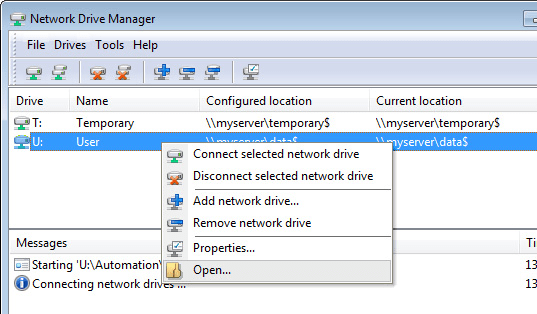
Network Drive Manager (NDM) is a utility for managing network drives, which brings added value to home users, small business users and large enterprise users that access network drives in a (wireless) network.
During Windows logon NDM ensures that all network drives under its control get connected and activated, where after they are periodically reconnected to prevent deactivation.
In case network resources are not (yet) available or if the connection with a network resource is temporarily lost (e.g. when resuming a notebook from standby or if a wireless network connection was interrupted), NDM actively attempts to reconnect the network drives.
Optionally it can run programs, open documents or mount TrueCrypt volumes after a network drive has been successfully connected.
What's wrong with mapping network drives in Windows?
Windows doesn't take the trouble to ensure network drives get properly connected after logon which frequently results in network drives that are visible in Windows Explorer, but that are not active.
This causes problems, e.g. when a network drive is used for centrally storing data like documents or settings. Applications that use these centrally stored files will complain or even fail to start because the network location is not accessible.
Even if Windows manages to connect network drives properly at startup, the next problem is that these network drives get deactivated (i.e. become inaccessible) after a certain amount of idle time. This might result in complaining applications again because they're not able to access their data on disk. It can even end in data loss if applications don't anticipate on these scenarios and if the Windows write caching mechanism produces "Windows Delayed Write Failed" messages.
Network Drive Manager (NDM) is a utility for managing network drives, which brings added value to home users, small business users and large enterprise users that access network drives in a (wireless) network.
During Windows logon NDM ensures that all network drives under its control get connected and activated, where after they are periodically reconnected to prevent deactivation.
In case network resources are not (yet) available or if the connection with a network resource is temporarily lost (e.g. when resuming a notebook from standby or if a wireless network connection was interrupted), NDM actively attempts to reconnect the network drives.
Optionally it can run programs, open documents or mount TrueCrypt volumes after a network drive has been successfully connected.
What's wrong with mapping network drives in Windows?
Windows doesn't take the trouble to ensure network drives get properly connected after logon which frequently results in network drives that are visible in Windows Explorer, but that are not active.
This causes problems, e.g. when a network drive is used for centrally storing data like documents or settings. Applications that use these centrally stored files will complain or even fail to start because the network location is not accessible.
Even if Windows manages to connect network drives properly at startup, the next problem is that these network drives get deactivated (i.e. become inaccessible) after a certain amount of idle time. This might result in complaining applications again because they're not able to access their data on disk. It can even end in data loss if applications don't anticipate on these scenarios and if the Windows write caching mechanism produces "Windows Delayed Write Failed" messages.

Saves us a lot of frustration about disconnected computers we had earlier in our network.
Rock solid, runs well after weeks of operation.