

 |
 |
|
|
 |
 |
 |
 |
|
|
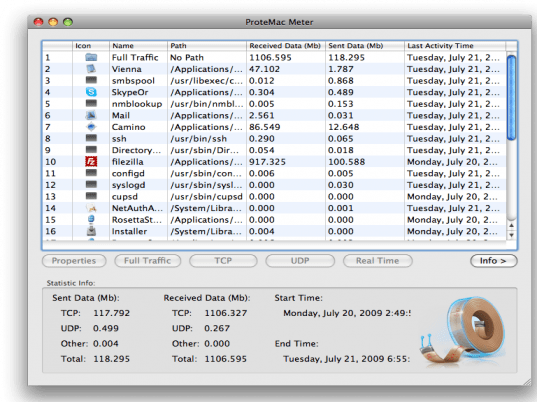
ProteMac Meter is a network traffic logger that allows you to monitor all internet and network traffic on your Mac, showing you exactly what was transmitted and to where. This includes all traffic initiated by software applications, services, web sites etc. The capability to audit what flows in and out of every piece of software is critical for security aware users. ProteMac Meter provides real-time processes (applications and services) monitoring and shows the history of every network activity. The program shows extensive information about each connection: application network connections, host availability, remote host name, amounts of incoming and outgoing traffic through connection or application, timestamps of the first and last activity, application that initiated or accepted this connection, full path to the application the process belongs to, and much more. The traffic summary indicator shows an upload and download speed graph and traffic totals. Visualizing your Internet activity is simple, even for inexperienced users. You can view all established connections, monitor network and per application traffic over a certain period, setup various notifications and much more. Use ProteMac Meter right from your menubar floating diagrams to see the application and network bytes flow.
|
|
Editor review: Reviewer, 2008-11-01 07:17:00
A tool that monitors your MAC (media access) layer and thereby allows you to catch any malicious activity.
Pros: ProteMac Meter is a tool that logs all network traffic that passes through the MAC (media access) layer on your computer. This includes information on which process / application is sending / receiving data over the network and also how many bytes are being sent / received. It also displays the remote host with whom this particular exchange is taking place. The log saves timestamps and thus is able to show a history of activity over time. The log can then be used to identify malicious activity, if any. This is useful for security purposes. Some graphing and traffic summary functions make the task of visualizing what’s going on in the network from the user’s MAC’s perspective easier. The full path to the process / application that is communication over the MAC is also provided. It features an attractive interface.
Cons: A logger works well and all necessary information is provided. But it may not be so simple for user to: a) recognize what is untoward activity and b) having recognized bad behavior how does the user stop the misbehaving application. Essentially this may be more suited to advanced users who will like seeing all this information conveyed to them. If the application had added the ability to kill / terminate processes from within the software window it would have proved to be more useful.
For security purposes, users are better off investing in an Internet Security suite.
Overall: 3 stars. 4 stars also possible. It basically does what it sets out to do. However, the question is one of utility and of usability, where it does fall short.
|
 |
 |
Visit homepage of ProteMac Meter
Download ProteMac Meter 3.2.2
Popular search terms related to ProteMac Meter:
audit, ad-aware, ad aware, mac, graph, network monitor, traffic, upload, activity, monitoring
|

internet connection basis on time internet connection speed monitor network speed monitor monitor network activity how to monitor internet connection monitor internet activity network logger real flow web activity monitoring mac internet

Programs related to ProteMac Meter
|