
Free Downloads Center
e.g. USB for Remote Desktop 2.5.1

Latest Reviews

Free Address Book 1.2

Free Address Book 1.2
Free Address Book, an advanced tool that will store and organize your addresses, phone numbers, mobile, fax, and so on of your contacts and partners.

Anyplace Control

Anyplace Control
Anyplace Control is a multi-functional remote PC access software to remotely access and control any PC via LAN or Internet.

Subscribe

USB for Remote Desktop 2.5.1 Download

Editor's rating  
Users' rating   (1 votes) Rate it!
License Shareware / $199
Downloads 1060
Publisher FabulaTech
File size 5706K
Date added 26-Jun-2009
USB for Remote Desktop screenshot

Enlarge screenshot

Publisher's description
Editor's review
Submit your review

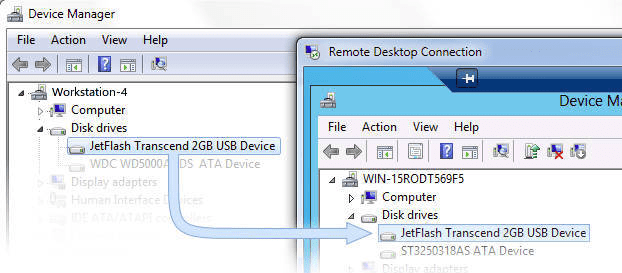
Access your local USB devices while working in remote Windows session. Sometimes, while working in remote desktop, you need access to your local devices. You can easily redirect disk drive or a printer into remote Windows session. But why can't you redirect all the rest of your USB devices just as easily? Unfortunately there is no standard way to make local USB devices available in remote Windows session. The only standard solution is plugging USB device directly to the remote server. But in the most of cases that is not acceptable. FabulaTech has resolved this problem in other extraordinary way. We've created USB for Remote Desktop that allows to work with your local USB devices from remote Windows session. Access your local USB devices while working in remote Windows session. Sometimes, while working in remote desktop, you need access to your local devices. You can easily redirect disk drive or a printer into remote Windows session. But why can't you redirect all the rest of your USB devices just as easily? Unfortunately there is no standard way to make local USB devices available in remote Windows session. The only standard solution is plugging USB device directly to the remote server. But in the most of cases that is not acceptable. FabulaTech has resolved this problem in other extraordinary way. We've created USB for Remote Desktop that allows to work with your local USB devices from remote Windows session. The program consists of a Server and a Workstation. You should install the Workstation on the computer to which the USB device is physically connected. Server side should be installed on the remote server from which you need to access your devices. USB for Remote Desktop is easy to install and use. It supports a wide range of USB devices. The program does not require any special knowledge and installs easily right out of the box.

Editor review: Reviewer, 2009-06-30 05:25:00

A solution that enables you to access USB resources on your local computer while working with Remote Desktop.

Features: For those users who need to be able to access their local USB resources while being connected to a remote computer, USB for Remote Desktop makes it possible. For example, you may need files that are on a USB drive that need to be accessed on the remote computer side, and that can now be done with the use of this software. USB for Remote Desktop works with most remote terminal solutions and is available for Windows as well as Linux. All one needs to do is install software on both the local and remote side and then they can connect through Remote Desktop (or other connection method) and the local USB resources will appear as if they are connected to the remote computer. The software also works with Open Solaris. The Server side needs to be Windows. USB for Remote Desktop can be bundled as an OEM for software that is produced by you (or company) that needs this capability in the software.

Overall: Depending on who needs to be able to access their local USB resources while connected to a remote computer, this is an excellent solution. The only negative thing about this software is that it needs to be installed at both ends of the remote connection (i.e. not only at the local computer where the USB device needs to be accessed but also on the remote computer from where you need to access) because it works in a Workstation / Server mode (Workstation = local computer side; Server = remote computer side). So one needs to explicit install this first on the remote computer before they can get started using this software. The full version is also a little over priced for the convenience that it provides. For most non-professional users the expense will be prohibitive and they will have to look for creative solutions for their specific needs.

Visit homepage of USB for Remote Desktop

Download USB for Remote Desktop 2.5.1


redirect server
remote printer over internet
remote pc desktop
local knowledge
usb format tool
users session
usb high speed
usb bootable iso
usb sticks
usb flash disk

Programs related to USB for Remote Desktop

Copyright © 2001-2009, Free Downloads Center.