


Editor's review
You may be having a number of accounts on different websites, blogs, social networking sites, web mail services etc. In order to secure your authentication parameters like usernames and passwords with effectiveness, you may use a number of different combinations of usernames and passwords. Apart from this, on various websites, you fill numerous forms for various purposes. Remembering and re-typing these forms and passwords may become a tedious and difficult issue when you have a number of such accounts. Apart from this, you should follow a practice of changing your passwords occasionally in order o protect your accounts. Handy Password manager v.4.9 is a simple tool for such purposes.
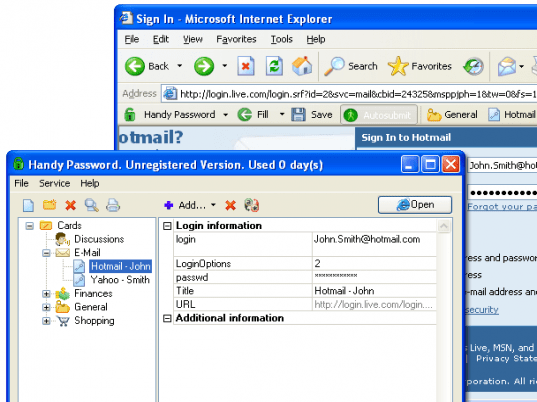
Handy Password manager by NovoSoft LLC is an easy to use form filler and password manager which helps in enhancing your web navigation speed and simultaneously maintaining the accuracy and security of your passwords. The program works directly with Mozilla Firefox and Internet Explorer as it integrates into these and shows up as a toolbar. For using this program, you have to create a master log-in id and password with this program and it saves all the entries of your forms and passwords for various websites in it’s database. The toolbar of this application has a lock icon displayed on the left hand side. As soon as you log-in with your master password, the lock turns green. It has separate single-click buttons for auto filling forms, saving passwords, auto-submitting the username and password for a certain account and various bookmark icons for your bookmarked websites. Its database is portable i.e. can be mounted on a flash drive and it has a provision for changing your passwords periodically and remembering them in its database.
Summing it up, Handy Password manager v.4.9 is a nice application which is suitable for both home as well as organizational usage. It is a fast and accurate application which maintains ease and speed of navigation and improves security of your important log-in information. Hence, it receives a score of four-and-a-half on the scale of five.
User comments