
Free Downloads Center
e.g. iolo Firewall 1.5.1.3

Latest Reviews

Vitascene Starterkit

Vitascene Starterkit
Vitascene Starterkit is a professional tool that allows to manage and enhance the effects and transitions of images.

eCover Engineer

eCover Engineer
eCover Engineer, the professional tool that allows you to create outstanding eBook covers, CD covers, DVD covers and software box covers.

Subscribe

iolo Firewall 1.5.1.3 Download

Editor's rating  
Users' rating   (1 votes) Rate it!
License Shareware / $39.95
Downloads 1316
Publisher iolo technologies, LLC
File size 8130KB
Date added 4-Jan-2008
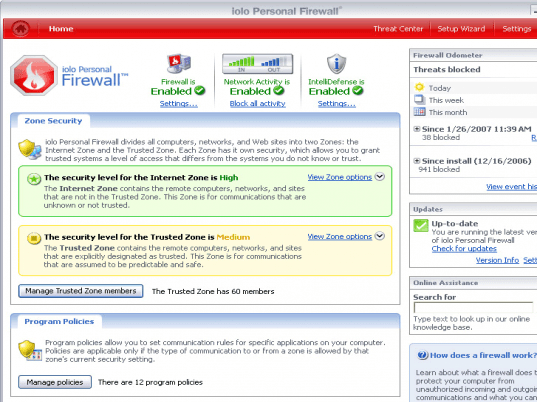
iolo Firewall screenshot

Enlarge screenshot

Publisher's description
Editor's review
Submit your review

iolo Personal Firewall puts up a barrier against Internet threats by only allowing desired communication to and from your computer. It prevents unauthorized users from gaining access to your PC and stealing information or causing damage. Use iolo Personal Firewall to prevent identify thieves from stealing private information, protect against malicious software that can destroy a computer, and eliminate the downtime, wasted resources, and lost data caused by intrusions and attacks. Unlike some firewalls, iolo Personal Firewall controls both incoming AND outgoing traffic. It automatically detects and blocks common attacks, with no configuration needed. The innovative "IntelliDefense" feature is a proprietary threat-evaluation technology that makes iolo Personal Firewall "smarter": the firewall makes informed decisions and you see fewer messages. You can create tailored policies so that individual applications have their own set of instructions on how they can communicate over the Internet and other networks. The firewall can also detect unauthorized modifications to programs; this provides protection from malicious software that attempts to mimic legitimate programs. Various statistics allow you to view and analyze intrusion attempts and detect security vulnerabilities. Viewing this history is useful to analyze possible security breaches and reveal suspicious patterns. The firewall also provides one-click restoration of default settings, for troubleshooting and worry-free configurations, and a one-click feature to block all network traffic for instant restrictions. With a guided setup wizard, preset security levels, one-click features, and automated decision-making, complicated setup is eliminated with iolo Personal Firewall. And advanced users have greater control: port settings are fully customizable; ICMP, IGMP, and broadcast/multicast protocols can be controlled; passive FTP and Remote Desktop connections can be blocked or allowed, and much more.

Editor review: Reviewer, 2008-01-15 10:57:00

Protecting valuable information present in their computer systems is matter of grave concern for a lot of people. There are different malicious programs and different entities that may attack your PC while you are surfing or downloading. To save yourself from such hazards the iolo Firewall 1.5.1.3 comes rather handy. It controls the incoming as well as outgoing traffic to keeps an accurate watch so that your information is secure and your system is secured from any unauthorized access.

iolo Firewall 1.5.1.3 after installation shows the Configuration Wizard to set the features that you want the firewall to work with. It would provide you with step by step features like PC usage, Preferences, Trusted websites, Program Policies, etc. With the PC Usage feature you can set the functions for the PC like the connecting, sharing files with other computers, and about using different applications, etc. Then comes the Preferences for the Firewall; you can make it show you the information for blocked communication, and processing of outgoing traffic. You can set the trusted websites that you want to by search for the visited sites or you can even skip the step. In your having many computers on your network then you can select the trusted computers that could access the shared information easily. You create and edit the program policies by selecting the Filename, set the Internet Zone and Trusted Zone options. When you are done with the changes then you can save them or anytime go back to the previous steps to make necessary changes. Then it comes to the main screen where you can set the level of Zone security to be low, medium or high. You can change the Firewall and Prompts and Notes settings for making the program work following your preferences.

iolo Firewall 1.5.1.3 is convenient and worth using as it holistically covers various aspects that are required for better protection of your PC. It has been rated with 4 rating points for its perfection securing your PC from unauthorized access and many other threats.

Visit homepage of iolo Firewall

Download iolo Firewall 1.5.1.3


password stealing
advanced personal firewall
block firewall
personal firewall

Programs related to iolo Firewall

Copyright © 2001-2009, Free Downloads Center.