
Free Downloads Center
e.g. Who is using my wireless network? 01.07.09

Latest Reviews

Vitascene Starterkit

Vitascene Starterkit
Vitascene Starterkit is a professional tool that allows to manage and enhance the effects and transitions of images.

eCover Engineer

eCover Engineer
eCover Engineer, the professional tool that allows you to create outstanding eBook covers, CD covers, DVD covers and software box covers.

Subscribe

Who is using my wireless network? 01.07.09 Download

Editor's rating  
Users' rating   (4 votes) Rate it!
License Freeware / $0.00
Downloads 3142
Publisher Per Hansen
File size 517K
Date added 30-Jul-2009
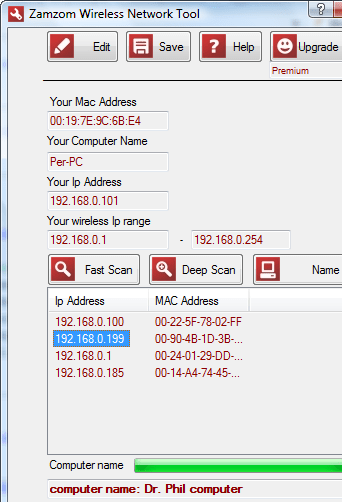
Who is using my wireless network? screenshot

Enlarge screenshot

Publisher's description
Editor's review
Submit your review

Multiple Computers on a Single Wireless Network? Find Out Who with Zamzom’s New Wireless Network Tool

Helping to protect wireless networks and maintain computer security, new freeware tool by Zamzom allows users to detect all computer names, Mac and IP addresses utilizing a single wireless network. Within seconds, Zamzom reveals all computers – both authorized and unauthorized – who have access to any given wireless network.
Worried about wireless security? New wireless network tool by Zamzom instantly provides users with information on each and every computer that has access to their wireless networks, including authorized and unauthorized users. From computer and user names to Mac and IP addresses, Zamzom wireless networking tool even identifies computers unseen in a program neighborhood and computers that can’t be pinged.

Most people rush through the setup process when it comes to establishing a new wireless network, says Per Hansen of Zamzom.com.

“That’s totally understandable, but it’s also quite risky because of security reasons,” he confirms. “A study of financial districts showed that 57 percent of the wireless networks were open or used weak WEP encryption.”

As wireless technology has developed and increased, so have the number of security risks. Hacking methods have become much more sophisticated and innovative, leaving companies, personal computers, and any other wireless device wide open and vulnerable. While there are a number of different methods of accessing a wireless network, there are also various manners in which to secure a network and counteract threats.

Zamzom wireless network tool does just that by informing users of precisely who is accessing their networks so that they can go about protecting their personal and company information.

Within 10 seconds, Zamzom helps users take valuable steps toward properly securing their wireless networks – a measure that should not be overlooked

Editor review: Reviewer, 2009-08-11 09:28:00

Have you been concerned about unauthorized PC users accessing and using your wireless networks frequently? This would trigger threats to your PC’s security, as your shared data might be compromised. In order to deal with such a situation, you might have started browsing through all over the web to get a competent solution that serves the purpose well. However, if you haven’t come across with any effective tool yet, then you may like trying out Who is using my wireless network? application. The utility has been designed for Mac PC users to facilitate users in tracking any authorized or unauthorized access to their wireless network. After executing it, the program displays your PC and wireless info, and detects entire PCs connected to your wireless network along with their IP and Mac addresses. It can efficiently identify the unseen PCs, and computers that can not be pinged.

The GUI of Who is using my wireless network? application is attractive and presents negotiable set of features for detecting unauthorized PCs connected to your wireless network. When you execute the program, it gathers the info regarding your Mac address, computer name, IP address, and wireless IP range. Now, you can either use Fast Scan or Deep Scan to let the program detect entire PCs using your wireless network. In addition, it provides True/False state for Administrator, Modem, Online, and LAN at the bottom side. Now, when the scanning finishes, the list of PCs connected to your wireless network would be displayed with IP address and Mac address. You can even get the names of their computer shown within the program screen. Further, the utility enables you to alter the wireless IP range, and save the screenshot of the results derived after scanning.

Using the Who is using my wireless network? 01.07.09 application, you an easily keep a track, if your wireless network is being used by any unauthorized person or PC. The program consists of impressive functions and reliable performance, which makes it deserve a score of 3.5 rating points.

Visit homepage of Who is using my wireless network?

Download Who is using my wireless network? 01.07.09


how to find others ip addresses
network security
how to network two computers together
wireless help
mac look
mac only
all in one security
hacking network
mac network
mac computer

Programs related to Who is using my wireless network?

Copyright © 2001-2009, Free Downloads Center.