

 |
 |
|
|
 |
 |
 |
 |
|
|
NetWorx is a simple and free, yet powerful tool that helps you objectively evaluate your bandwidth situation. You can use it to collect bandwidth usage data and measure the speed of your Internet or any other network connection.
NetWorx can help you identify possible sources of network problems, ensure that you don't exceed the bandwidth limits specified by your ISP, or track down suspicious network activity characteristic of Trojan horses and hacker attacks. The program allows you to monitor all your network connections or a specific network connection (such as Ethernet or PPP) only.
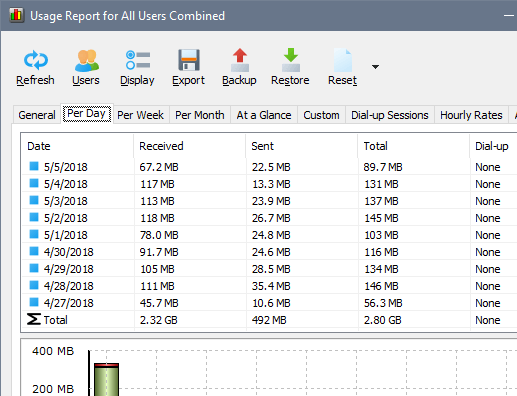
The software also features a system of highly customizable visual and sound alerts. You can set it up to alert you when the network connection is down or when some suspicious activity, such as unusually heavy data flow, occurs. It can also automatically disconnect all dialup connections and shut down the system. The incoming and outgoing traffic is represented on a line chart and logged to a file, so that you can always view statistics about your daily, weekly and monthly bandwidth usage and dialup duration. The reports can be exported to a variety of formats, such as HTML, MS Word and Excel, for further analysis.
With NetWorx you can:
* Find out and monitor how fast your Internet connection is.
* Find out and monitor how much Internet traffic you consume.
* Verify whether your ISP charges your Internet usage fairly.
* Detect a suspicious network activity on your computer.
* Perform simple network tests such as ping and trace route.
* Be notified about excessive Internet usage.
|
|
Editor review: Reviewer, 2008-12-08 08:00:00
A tool for monitoring a user’s internet connection.
Pros: NetWorx allows a user to monitor the user’s connection to the internet. A user can find out how fast the connection is at any given time. It can log over time the traffic usage by the user. This helps to verify (if required) whether or not the user’s ISP is charging accurately. Suspicious activity (such as outgoing by a Trojan, or incoming by a remote hacker) on the user’s internet connection is also recorded and the user can be notified or alert. There are a host of notification and alert options, and the types, sounds etc. of alerts and notifications can be customized easily using a variety of options. It features long terms statistics so that daily, weekly, monthly usage and connection duration is recorded and these can be used for analysis. Reports can be saved in several different formats including HTML, MS Word and MS Excel. Some simple network tests such as ping for connectivity and trace route can also be performed from within the software itself.
Cons: The only customization options are the sounds and alerts that are generated. There doesn’t seem to be any option to monitor for a certain kind of behavior. I suppose this is not strange considering the simplicity of the interface. However, just because the application is targeted towards the average user does not mean that it should actively discourage advanced users. The incoming and outgoing traffic chart is also available on Windows Task manager. Ping and trace route capabilities are available elsewhere.
Overall: 3 stars. 4 stars also possible. It seems to perform the monitoring function well (although this is hard to verify). But it has limitations in terms of what it can do, and the lack of customization makes it so that the user cannot fine tune it according to their requirements. The interface is overly simplified, which makes it easy to use but unattractive to advanced users due to lack of functionality.
|
 |
 |
Visit homepage of NetWorx
Download NetWorx 4.0
Popular search terms related to NetWorx:
flow chart, hacker, trojan, measure, alert, chart, network monitor, traffic, collect, modem
|

dialup modem bandwidth management tool activity network internet bandwidth monitor track network connection traffic usage serial ethernet softperfect research speed hacker log incoming outgoing

Programs related to NetWorx
|