
Free Downloads Center
e.g. Laplink Everywhere 5

Latest Reviews

Vitascene Starterkit

Vitascene Starterkit
Vitascene Starterkit is a professional tool that allows to manage and enhance the effects and transitions of images.

eCover Engineer

eCover Engineer
eCover Engineer, the professional tool that allows you to create outstanding eBook covers, CD covers, DVD covers and software box covers.

Subscribe

Laplink Everywhere 5 Download

Editor's rating  
Users' rating   (1 votes) Rate it!
License Freeware / $0.00
Downloads 1539
Publisher Danny Starr
File size 12358K
Date added 26-Jan-2009
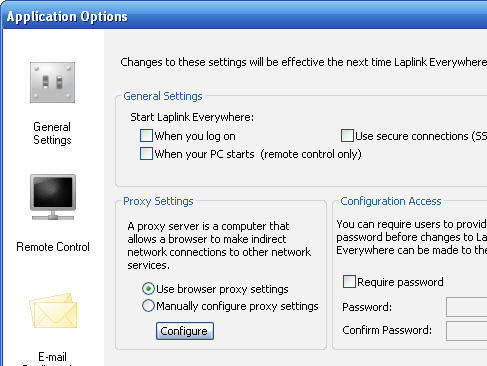
Laplink Everywhere screenshot

Enlarge screenshot

Publisher's description
Editor's review
Submit your review

Total freedom from your office or home PCs while staying connected, anytime and anywhere. That’s Laplink Everywhere.

Enjoy fast, simple, and secure remote access to all your PCs from anywhere, using any web browser on any device including PCs, mobile phones, Macs or even a Nintendo Wii! If you can access the Internet, you can get access to your PCs using Laplink Everywhere.

3 Options for Remote Access:

1. Laplink Toolbar

Install the free Laplink Toolbar for Internet Explorer and experience the first remote access technology to offer you one-click access to your PC. Search your PC, send and transfer files remotely, launch full remote control, access Outlook, and more - fast, easy, with just one click!

2. Mobile Phone

Laplink Everywhere is compatible with all mobile web-enabled devices that have an internet browser, including smartphones such as Windows Mobile 5 and 6, Symbian, BlackBerry iPhone and more!

3. The Web

Using any web browser simply go to lle5.LL2go.com, to bring your PC to you. Using the same technology as Internet banking, you can securely use any PC, public or private, to remotely access your PC.

Upgrade for Total Access

Your free download of Laplink Everywhere gives you unlimited remote access to your PC for 30 days. After your 30 days with the full version, Laplink Everywhere will become the free limited version, allowing you to remotely access your PC with remote desktop search and send, access to Internet Favorites (bookmarks) and more. No charge, no limits, no expiry dates, no strings attached.

You can upgrade anytime to the full version and get total remote access to your PC with all the features of Laplink Everywhere. Pricing for total remote access to a single PC is USD 49.95 (EUR 39,95 / GBP 34.95) a year - or buy licenses for two PCs and get the third free!

Editor review: Reviewer, 2009-02-05 08:22:00

While working at your office, you cannot carry your PC and its data everywhere. In such a situation, you might face difficulty in completing your work relating important files or other project documents. Now, what if you get access to your PC from anywhere and anytime? It can easily be done by using the Laplink Everywhere 5. The software supports you in remotely accessing all your PCs data in a secure and quick manner, from just about anywhere. It can be done using web browser of any device, PC, Macs, mobile phones and also the Nintendo Wii!

After you launch the Laplink Everywhere 5 you are required to enter some details for assigning host computer to existing Laplink account. Filling up the information, you can set email configurations by selecting Microsoft email program and settings Server, Account, and Authentication information. Next, validating the information, the program screen appears on the screen, with its icon placed in the system tray. The interface presents different options placed on it, like Application Options, View Logs, Add User, Edit Access, Remove User, and Account Settings. The application owner’s name is shown on the screen by default, and you can Add Users giving them access to your PC, along with defining their privileges with Edit Access. The ‘Account Settings’ gives you access to online configurations of Laplink account to make desired alterations. Using the ‘Application Options’ you can alter General Settings, Proxy Settings, Configuration Access with ‘General Settings’; Microsoft RDP, Laplink Screen Sharing with ‘Remote Control’; and Email Client, Linking to Files through ‘E-mail Configuration’. Further, with the ‘View Logs’ you can view the complete activity record with File Log, Connections, and E-mail. It would work while staying in the system tray and you can effortlessly access your PC through internet from anywhere.

The Laplink Everywhere 5 comes across as a proficient utility can do wonders for your work by allowing you to access your data on the go. It earns a score of 3.5 rating points on account of its usability and the sheer convenience it offers.

Visit homepage of Laplink Everywhere

Download Laplink Everywhere 5


mobile device for pc internet access
launch internet explorer browser
remote control browser
mobile phone files
remote control mobile
mobile remote control
mobile phone browser
remote desktop web
send files to phone
phone transfer

Programs related to Laplink Everywhere

Copyright © 2001-2009, Free Downloads Center.