


Editor's review
Do you often need to startup your computer to get the updates relating to the Google finance portfolio courses? If you are fed up of this process, won’t you like to have something that could make the work easier? Now you can get all the updates at your mobile with My Portfolio 1.0. This software is easy to work and is a valuable addition to your phone. You can get the Portfolio updates as automatic or manual as per your needs. It is also capable of providing the history records of the portfolio courses so that you can get the required data whenever required. The interface is friendly and easy to use.
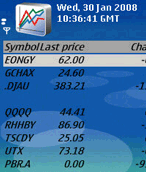
For adding, updating and managing your Google portfolio the software My Portfolio 1.0 is worth using as you can get information on your mobile phone when required. When you have transferred the file and installed the program at your phone then you can start working with it. Go to the Program or Own file for the program and set the login ID with the ‘Settings’. The Portfolio is shown in the list form; Symbol, Last Price, Change in Percent and Mkt Cap. You can view the details of all the items and for updating you can select to update ‘Manually’ or ‘Automatically’. You would get the updates that you can save. You can even have the glance over the history of the rates of Google finance course. You can have the history recorded by setting the Start and End date for it and select to connect. Having your Google finance portfolio on your mobile phone you need not to sit in front of your PC every time you want to know about any details.
My Portfolio 1.0 for the mobile phone gives you the freedom to stay away from your PC and still keep an eye on your Google finance portfolio. The rating has been set at 4 points on the scale of 5 for the automatic update, history records, and other features of the software. The software is sure to gain currency amongst many users owing to the convenience of accessibly it allows.
User comments