
Free Downloads Center
e.g. Browse3D 3.1

Latest Reviews

EyeLine Video Surveillance Software

EyeLine Video Surveillance Software
EyeLine Video Surveillance Software is a powerful and capable video monitoring and recording software.

Classified Website Submission

Classified Website Submission
Classified Website Submission, can complete the task of submitting thousands of real free classified ads without any hassles.

Subscribe

Browse3D 3.1 Download

Editor's rating  
Users' rating   (7 votes) Rate it!
License Freeware / $0
Downloads 3868
Publisher Browse3D Corporation
File size 2178K
Date added 21-Apr-2005
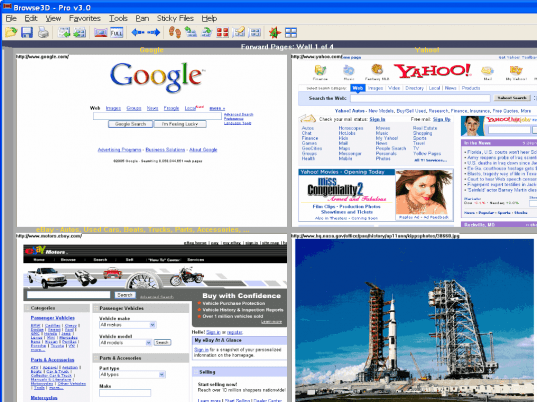
Browse3D screenshot

Enlarge screenshot

Publisher's description
Editor's review
Submit your review

Why browse the Web one page at a time? Save time, save pages, and never get lost again. Browse3D uses multiple browsers to provide 3 walls of active web pages (not just tabs.) Any open page is easy to find and use because its image is always viewable. The center wall is the main browser, a left history wall displays all the pages you’ve visited, and a right wall is for web pages you want to continue using of save as a group of pages. Advanced search and anti pop-up features are integrated with Windows XP SP2. Save time by loading links from the current web page without interrupting where you are. View 4 web pages at once and eliminate the constant need for the back button using the history wall that shows an image of ever page you’ve visited (not just a tab or short description) and return directly to any of those pages even if you were there 20 pages ago. Save rooms of your research containing multiple web pages, and exchange these rooms with colleagues or friends. Browse3D, the winner of the Best Internet Software award at the Comdex Fall 2001 Technology Show, is the next generation of web browsers. Other features include:

(a) View up to 4 web pages at one time and then 4 more with the click of the mouse
(b) Select links and fetch new web pages without interrupting the current page view
(c) Speed your web searches and browsing session by automatically loading the top search results top the right wall
(d) Easily navigate and use multiple pages all within one window
(e) Save multiple active and static pages by making them "sticky" to create rooms of current research
(f) Share saved rooms of web pages with colleagues or friends
(g) Advanced pop-up features allow the user the option of where to load new windows
(h) Compare multiple shopping or auction items side by side

Other features include zooming in on pages, scrolling through web page images or flipping the wall to instantly scan additional web pages.

Editor review: Daily Reviews Team, 2005-03-29 01:10:10

    Browse3D is an award winning and acclaimed software for its numerous features and capabilities.
    You can use your browsing time productively by navigating through multiple web pages at the same time. Web pages can be loaded and managed better using the three-walled graphical interface of this tool. As each web page displays a unique visual reference it is easy to track the pages you are browsing. Pop ups can be handled optimally using the advanced features which come with Windows XP SP2. You can view as many as four pages simultaneously and also view a history of previously visited web pages which can be accessed easily. These links can be loaded without interrupting your current work. You can save on the time taken to search and browse through web pages by automatically loading the top search results. For all those who spend extensive time and effort on research activities, this tool is a gift.
    Browse3D provides a visual advantage over other competitor tools and is now available for free.

Visit homepage of Browse3D

Download Browse3D 3.1


page flipping
multiple pages
wall game
windows nt sp2
web photo view
wall calendar
current web users
web cam save
page loading
image web

Programs related to Browse3D

Copyright © 2001-2009, Free Downloads Center.