


Editor's review
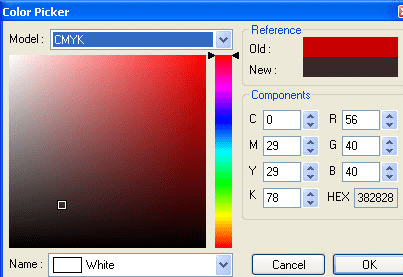
For all those application developers who want a diverse set of colors for designing or give an elegant look to their applications can find a solution in the name of Color Picker ActiveX Control 1.5. Color Picker ActiveX is a brilliant tool that will assist you to select from the various color models such as Red, Green, Blue(RGB); Hue, Saturation, Brightness (HSB); and Cyan Yellow, Magenta, Black (CMYK). Color Picker ActiveX Control as its name suggests any environment supporting ActiveX technology such as Visual FoxPro, HTML, Visual C++, .NET, Visual Basic, Office document etc. can effectively operate this coloring application effectively. The process of working with this application is so very simple that even less technically sound person can also operate it with the innate interface it provides. All you need to do is pick the color that you have decided and apply it where you want to color. You will be provided an immense collection of colors to choose from.
As you will get along with Color Picker ActiveX you will be able to view 2 color boxes which are located at the both ends, one left and other right. Right box represents selected colors and left box represents current colors. This feature will easily help you to easily differentiate the difference between to colors while you are working. To select different shades of color, the Color Picker dialog-box will help you to do it by simply selecting the colors by defining them numerically or selecting them visually. Besides the color modes that is RGB or HSB or CMYK, this tool offers a collection of 138 predefined colors. This tool can be conveniently installed and uninstalled from your system with a single amount of trouble.
This Color picker is a majestic find for any programmer who can master it with least possible efforts and add a fantastic touch to the development of your project. We rate it with 4 on a scale for the its well thought out functions.
User comments