


Editor's review
Now exporting your data to Excel, CSV, XML or any other format can become and effortless activity with the FlySpeed Data Export 2.0 utility which successfully achieves the tasks in appreciable lesser time. You need to follow simple steps to have the data transferred from the desktop or server database to these major formats. It has the features that help you to get the data without losing any content. The software is capable of saving all the exporting parameters so that they can be used again for next export process. You would not require any perquisite technical knowledge to get the data exported to XML, CSV, etc files from the database.
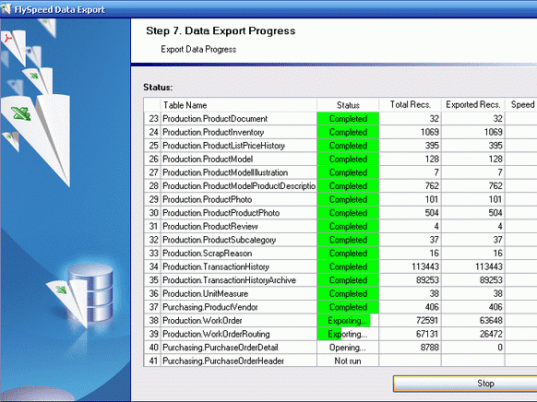
To start working with FlySpeed Data Export 2.0 you need to follow a step by step process. Starting with it first you are greeted with a welcome screen, then for continuing with the steps you need click on ‘Next’. First you need to select the connection type to get the access to the database to be OLE DB Provider or ODBC Driver. Select the source database and set other features the test the connection. Going further you are shown the Available Tables from which you can make the selection for the ones required by you. After the selection you need to choose the data export type to be CSV, Excel, Text File, DBF, etc. Then select the default output directory for saving the results. Make the selection for the fields to be exported and arrange them in the proper order. Select the Data Export Options for the Format, Data Format, and Performance. These contain the features like font style, number format, currency format, source database option, etc. When you’re done with the selections then finally you get the exporting process started. It also shows the status while it exports the data. The process is as simple as it appears to be.
FlySpeed Data Export 2.0 is capable of connecting to almost all prominent databases and gets the tables exported without losing any content. For the perfection that the software works with and for supporting the various types of database sources it has been given 4 rating points.
User comments