
Free Downloads Center
e.g. Dr.Explain 3.1.202

Latest Reviews

Astrum InstallWizard

Astrum InstallWizard
Astrum InstallWizard is a real time wizard in creating professional software installation programs.

Free Antispam Scanner

Free Antispam Scanner
Free Antispam Scanner is an exceptional tool that will keep your inbox clean from spam messages.

Subscribe

Dr.Explain 3.1.202 Download

Editor's rating  
Users' rating   (5 votes) Rate it!
License Shareware / $125
Downloads 1300
Publisher Indigo Byte Systems
File size 12573K
Date added 8-Sep-2008
Dr.Explain screenshot

Enlarge screenshot

Publisher's description
Editor's review
Submit your review

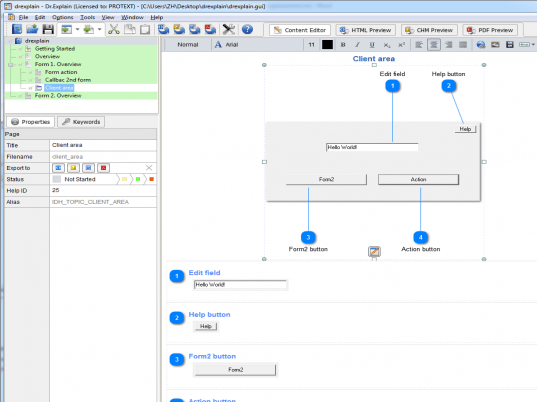
Dr.Explain is a help authoring tool for rapid creation of help files and user guides. Using its unique auto capture and annotation technology, developers can document their software interfaces almost hands down. When set to work, Dr.Explain parses a live application and automatically produces screenshots of its windows along with a sequence of callouts for each window control. Users only have to add some description to each callout as needed. Dr.Explain can output the results as a set of HTML pages, CHM help file or RTF document complete with screenshots, cross-references, menus and an index page. The output is accurate and professional.

Dr.Explain is ideal for software developers, ISV, micro ISV and technical writers. It handles all the complexities of help formatting and generation, allowing them to concentrate on pure writing. This saves them days that would otherwise be wasted. Dr.Explain is also great to keep help documentation in sync with software updates. Since all data is stored in a single source file, developers can easily edit or update any portion of an existing file. In doing this, they are not required to rearrange the entire help or generate a new file. Developers will also benefit from the opportunity to customize the appearance of their help file to make it match their corporate style. They can customize its visual elements, menus and page layout. On top of all this is an affordable price, which is lower than with the majority of other software documentation tools.

Editor review: Reviewer, 2009-02-09 08:38:00

A software help authoring tool. Dr.Explain captures windows from a live application, makes screenshots and automatically adds references to all window`s controls: buttons, fields, lists, and etc. Dr.Explain makes CHM, RTF, and HTML help files.

Features: Dr.Explain is a tool that makes Help files easily in different formats. It creates this documentation quickly. It is able to analyze the structure of an UI, capture screenshots, identify graphic items such as buttons etc so that just adding some relevant text makes the documentation complete very quickly. It parses a live application and automatically produces screenshots of its windows along with a sequence of callouts for each window control. This analysis of the structure is done irrespective of what technology windows software, web site, Java or Flash application is involved. Each of these call outs are to be described in the document and the documentation is done. You can choose between several formats. CHM, HTML or RTF are the formats in which the final documentation can be created.

The package takes care of formatting and the document generation, usually the necessary but tedious part of the work. Documenters can concentrate on how best to describe the operations-the heart of the documentation. All the data is maintained in a single source file, thus it is very useful for ensure the help update also is in sync wit software update and all versions are the same. Editing the available original version help makes sure no inconsistency creeps in. In doing this, they are not required to rearrange the entire help or generate a new file. Customizing options let the developers match a particular corporate style easily. All visual elements, menus and page layouts can be customized. The same help files can be invoked from any programming language environment.

Overall: Useful functionality is backed by ease of use and meaningful help in document creation. This is good stuff. This is a big help in a routine yet a vital area of a software product development.

Visit homepage of Dr.Explain

Download Dr.Explain 3.1.202


open chm files
word chm
make screenshots
rtf html
abc amber chm converter
convert jpg to rtf
file sync
editor chm
usb sync
chm pdf

Programs related to Dr.Explain

Copyright © 2001-2009, Free Downloads Center.