


Editor's review
While creating any application, software developers always remain in search of an effectual tool that can assist them in developing the installer file. Installer files are required to help end-users easy deploy the applications. If you’re also seeking for an installer creator application and haven’t been able to find an apt one for so long, then you can try out CreateInstall 4.11. It allows you creating setup installer conveniently with the help of customizable wizards, and other supported features. You can create single as well as multi-projects installers, as the application even provides you batch process feature. It enables you to attach the necessary application files like end-user license agreement, product info, install folders, etc.
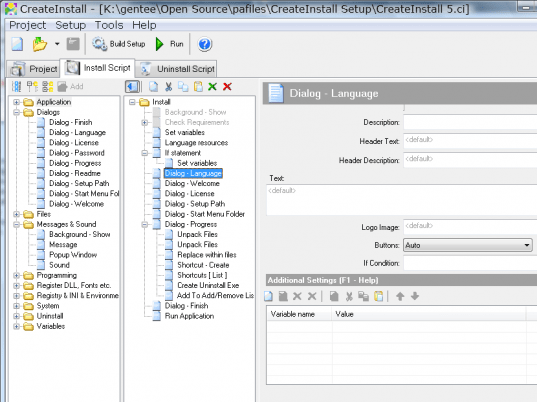
CreateInstall 4.11 consists of a modestly designed interface and sports a sophisticated feature-set. When you start creating an installer setup for your application you need to select the necessary elements according to the provided options. In the series of options given in tabs, the first option is ‘Output’ through which you need to select the output folder, setup executable, volumes, and install features. Next is the File option, which is used for specifying the files that are required to be integrated in installation package, like description, group name, compression type, source files, destination folder, custom path, etc. The Wizard is available to carry out the sequential steps to insert various files and features like dialogs, registry files, INI files, run application, and others. To specify the sequence of commands relating macros, dialog, registry, etc and enter description for different features, you can use the Install option. The uninstall tab allows you select the files you want to be removed during uninstallation. Finally, completing the selection process, you simply need to create setup. With ‘Options’ you can further configure the CreateInstall application’s functioning.
The CreateInstall 4.11 facilitates its users to create installer files with simple steps, including the necessary files and details. A score of 4.5 rating points have been assigned to the software for its broad range of options, and its sophisticated functioning.
User comments