


Editor's review
If you are software publisher then you will definitely appreciate that creation of an efficient installer application is indispensable for launching your software product. A good installer application assures easy installation of the software, thereby assist in creating an impact over the end users. In addition, the installer is integrated to make your software easily distributable over internet, or CD/DVD. So, if you’re a developer and seeking for an apt tool to create installer for your software product, then you may try out DeployMaster 3.0.1. The program includes a variety of features that enable various features that make it easier for developers to insert the relevant information and files. The program’s functioning is user-friendly, and hence it is easily-operable for both novice as well as expert users.
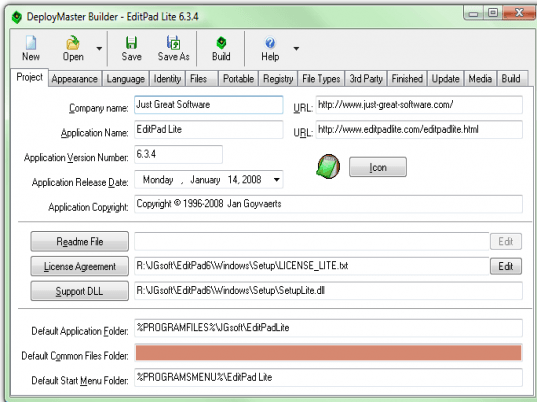
DeployMaster 3.0.1 is designed with options placed in tabs that make it easy for the users to scroll through the desired one and make the necessary changes. To begin with, the first ‘Project’ tab lets you to enter the information like company name, application name, application version number, application copyright, URL, icon, readme file, license agreement, default folders, etc. The second tab consists of features to decide the appearance of the installer by enabling the options to display ‘advanced options installation’ feature, color installer window background, cover screen background, change colors for various objects, and set the labels. Next, you can even set the languages for the user convenience. After Languages is the Identity tab where you can set the installer to prompt user for entering username, serial number, registration code, etc and also list the valid registration codes and serial numbers. Further, it allows you to add files, components, subfolder, shortcuts, file tree, and URL. Moreover, the application allows you create the installer that can be installed on portable media. Along with these, you can specify registry keys, value, file types, text description, icon, requirement of other application like .Net, installation completion message, installation of update version, way of file deployment, etc. Finally, filling the required information, you can Build Installation Program.
DeployMaster 3.0.1 sports a number of features and applications that help you getting a professionally created installer file effortlessly. Taking all its matchless features and incredible functioning into account, the utility deserves to be rated with 4.5 points.
User comments