
Free Downloads Center
e.g. Software Installation Setup Package 2.0.1.5

Categories

Latest Reviews

Ainvo Registry Defrag

Ainvo Registry Defrag
Ainvo Registry Defrag is a simple tool with the capability to keep your system working in a smooth and stable condition.

VintaSoftTwain.NET Library

VintaSoftTwain.NET Library
VintaSoftTwain.NET Library is a handy and useful .NET library with which you can control the working of scanners, cameras and any other TWAIN devices.

Subscribe

Software Installation Setup Package 2.0.1.5 Download

Editor's rating  
Users' rating   (1 votes) Rate it!
License Shareware / $99
Downloads 1005
Publisher MSI to EXE Converter
File size 9492K
Date added 29-Sep-2008
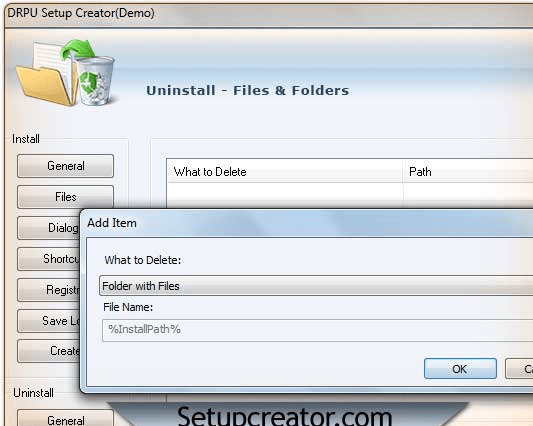
Software Installation Setup Package screenshot

Enlarge screenshot

Publisher's description
Editor's review
Submit your review

Windows Installer is an installation technology that streamlines the application installation process and offers continued resiliency for applications, including the ability to install additional features on demand, uninstall applications cleanly, automatically repair applications, and roll back applications reliably. Software facilitates to add complete directory that enclosed with user Installer section, destination path, End user License Agreement, Launch Program, Program icon and screen shots with text files. MSI Setup installer uses advance deployment scenarios for configuring sources flexibility when working with program dependencies like configuring system, validating platform requirement, updating windows installer setup packages and many more. The cost-effective setup installer maker has most attractive graphical user interface and no programming or technical skills are required to work on setup generator. It should be able to guide the user through the whole setup process, allowing him to understand what he is doing about and how to manage some possible errors.
Features:
* Configuring general program changes for windows Installer setup packages.
* Deploying set packages for user and also for system requirement.
* Configuring the best user interface level to attend installation or uninstallation of software.
* Windows installer prominently uses the feature called advertising.
* Setup installer packages can be installed on windows 98 ME XP NT 2000 and Vista operating systems.
* Setup Builder offers unsurpassed support for multilingual installations right out of the box.

Editor review: Reviewer, 2009-01-11 07:10:00

A fully functional setup installer is indispensable for any application. The creation of useful setup installer requires users compiling application related files in an orderly manner, which facilitates ultimate users in installing the file easily. Hence, in order to form an appropriate installer you often look out for an effectual installer creator application. In consideration to the requirement, you may find the Software Installation Setup Package 2.0.1.5 to be an apt tool. It enables developers to create installer set up that would streamline the installation process of your application, and supports sustained resiliency for applications. It supports adding complete directory including Installer Section, End-user License Agreement, Destination Path, Launch Program, Uninstall, files, etc.

With the Software Installation Setup Package 2.0.1.5, it becomes a cake walk for the developers to create Installer setups. The left pane on application interface presents main options for making necessary selections, and the right area is set to work with sub-options. With the first ‘Install’ option you can enter program info, like product name, version, company name, copyright notice, save install as, etc. With next ‘Files’ option you can add Source files and set their Destination Path, and using Dialog feature you can select product folder, product group menu, and choose to display ‘Launch Application’ check box and ‘End User License Agreement Dialog’. Further ‘Shortcuts’ option is to add program shortcuts on desktop, group launch, program menu and start menu by selecting necessary files. Moving on you can add Registry items, save log of the carried out process. Furthermore, you can set Uninstall features by setting the ‘Uninstall Title’, ‘Uninstall File Name’, ‘Visit Product Uninstall Page’, and Files and Folders, and Registry details to be deleted. Finally, click Create and the program would generate the Installer setup.

Using the Software Installation Setup Package 2.0.1.5, you can create many installer setups with the necessary attributes. Considering its handy feature-set, covering almost all the application installation and uninstallation process, the program is deservingly rated with 4 points.

Visit homepage of Software Installation Setup Package

Download Software Installation Setup Package 2.0.1.5


update windows xp to windows vista
install maker
exe to icon
icon exe
text converter
converter plus
windows update installer
little setup builder
icon converter
process maker

Programs related to Software Installation Setup Package

Copyright © 2001-2009, Free Downloads Center.