


Publisher's description
BackgroundCMD is a command prompt folder background shell
extension. It allows you to start a command prompt (an instance of
cmd.exe) from within any directory that you're currently browsing.
The are many command prompt shell extensions out there. However,
as far as I can tell, none of them allow you to open a console window in
the current directory that you're browsing. Most will only allow you to
right-click a folder and have the command prompt start in that folder.
This can be quite a nuisance. When browsing a directory, I don't want
to have to go up one level just to start the command prompt. And what
about the desktop? Do I really have to browse to my user folder under
"C:\Documents and Settings\Administrator" just to get it working?
So I wrote one that works properly, because I never know when I'll
need a console window until I'm in the folder I'll need it in. I relied upon
The Code Project's excellent "The Complete Idiot's Guide to Writing
Shell Extensions" series.
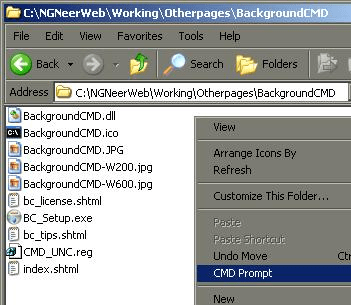
Simply right-click the directory background, and select "CMD
Prompt" from the context menu. The new console's initial path
will be set to the directory you were browsing.
extension. It allows you to start a command prompt (an instance of
cmd.exe) from within any directory that you're currently browsing.
The are many command prompt shell extensions out there. However,
as far as I can tell, none of them allow you to open a console window in
the current directory that you're browsing. Most will only allow you to
right-click a folder and have the command prompt start in that folder.
This can be quite a nuisance. When browsing a directory, I don't want
to have to go up one level just to start the command prompt. And what
about the desktop? Do I really have to browse to my user folder under
"C:\Documents and Settings\Administrator" just to get it working?
So I wrote one that works properly, because I never know when I'll
need a console window until I'm in the folder I'll need it in. I relied upon
The Code Project's excellent "The Complete Idiot's Guide to Writing
Shell Extensions" series.
Simply right-click the directory background, and select "CMD
Prompt" from the context menu. The new console's initial path
will be set to the directory you were browsing.
User comments