
Free Downloads Center
e.g. Fast Folder Access 1.8

Latest Reviews

Popfax-Printer Internet fax

Popfax-Printer Internet fax
Popfax-Printer Internet fax, makes it simpler to send, receive and print faxes using your Internet connection.

SmartSerialMail

SmartSerialMail
SmartSerialMail, with the smart capabilities of this application you can set up a successful newsletter campaign.

Subscribe

Fast Folder Access 1.8 Download

Editor's rating  
Users' rating   (8 votes) Rate it!
License Shareware / $19.95
Downloads 10806
Publisher Eusing Software
File size 1021K
Date added 3-Nov-2005
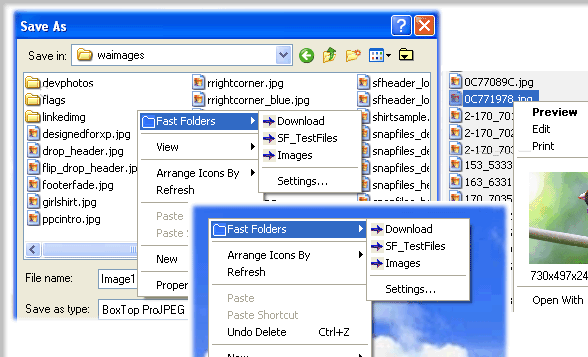
Fast Folder Access screenshot

Enlarge screenshot

Publisher's description
Editor's review
Submit your review

Fast Folder Access is a shell enhancement that gives you quick jump to your favorite folders in Common Open/Save dialogs, in Windows Explorer, the desktop and the Start Button.You access the Fast Folder menu by right-clicking anywhere in the File,Directory,directory background (right pane) of Windows Explorer, the "white area" of Common Open/Save -dialogs,on the desktop and the Start button.

In the menu that pops up, there will be a new item called "Fast Folders" with a list of folders that you have added from within Fast Folder Access or from the item "Add to Fast Folder" on the pop-up menu by right-clicking the directory in Windows Explorer. Then you can fast and easy browse these folders.

It's also an add-on for viewing images in Windows Explorer that lets you right-click on an image file to bring up a miniature image and image file information.

Also you can add any file as shortcut to Quick Launch or create new folder.Having created the new folder, you can add or drag the shortcuts to this new submenu.

Fast Folder Access runs automatically as part of the Windows Explorer context menu, so you will never need to start the program otherwise you want to edit the list of folders.

Editor review: Daily Reviews Team, 2004-10-29 01:10:10

    Fast Folder Access is the fastest way you can access your files in the Windows Explorer.
    The program can function completely and accurately without even being run each time. It can operate as the part of your context menu in your Windows Explorer. All you need to do is to right-click on your Explorer and the Fast Folder option is displayed. You can add all the files and folders you need to access to this list and they are available to you instantly. You can access all folders in open/save dialog boxes as well as Windows Explorer with ease. You can also use it to view the details about an image file as well as preview it by right-clicking it in the Explorer Window. Files on the desktop and on the Start button can also be included in the list of fast access folders.
    It obviously will prove itself to be the fastest way to access your data without ever needing to remember long paths and addresses of your data files.

Visit homepage of Fast Folder Access

Download Fast Folder Access 1.8


jump start
explorer file preview
quick start
desktop explorer
folder access control
edit button image
fast avi joiner
add image to mp3
fast rm converter
create folder password

Programs related to Fast Folder Access

Copyright © 2001-2009, Free Downloads Center.