


Publisher's description
Bee Wallpapers is a wallpaper randomizer program with a user friendly interface.
It automatically changes the wallpaper displayed on your screen at predefined intervals or at Windows startup.
You can directly download wallpapers from the beewallpapers.com server or add your own wallpapers to your personal list(s).
There are thousands of wallpapers to choose from and new wallpapers are added on a regular basis.
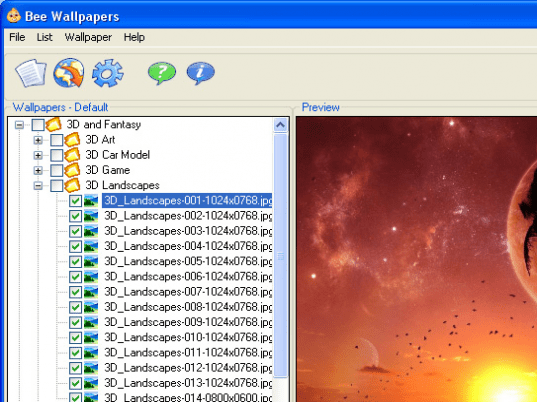
All wallpapers are organized in a tree structure based on categories.
There are 5 possible wallpaper positions (Center, Tile, Stretch, Zoom or Custom).
There is also the option to display a calendar image on your desktop (which displays the current date).
Here are some key features of Bee Wallpapers:
* User friendly interface.
* Automatically changes your desktop wallpaper at predefined intervals or at windows startup.
* Sits in system tray when minimized (next to the clock).
* You can pause the randomizer at any time, by right clicking in the system tray.
* Directly download wallpapers from our server from within the program.
* Choose from thousands of wallpapers
* We add new wallpapers to our online collection on a regular basis.
* Our wallpapers are available in different screen sizes (dimensions).
* Drag and drop images from your browser or any other program into the list.
* Add your own wallpapers to the list.
* Save multiple wallpaper lists.
* Add (game) screenshots to your list with just a single click.
* All wallpapers are saved in a tree structure
* Create your own categories and subcategories
* Display the current date on your Desktop.
* Manually randomize wallpaper by doubleclicking in your system tray.
* Each wallpaper can have it's own position: center, tile, stretch, zoom or custom
* Many Preview Options (Screen Preview, Stretch, Real Size ...)
* Supports many graphic formats (bmp, jpg, gif, png ...).
* Preview the wallpapers from within the program before you download them.
* Launch on windows startup option.
It automatically changes the wallpaper displayed on your screen at predefined intervals or at Windows startup.
You can directly download wallpapers from the beewallpapers.com server or add your own wallpapers to your personal list(s).
There are thousands of wallpapers to choose from and new wallpapers are added on a regular basis.
All wallpapers are organized in a tree structure based on categories.
There are 5 possible wallpaper positions (Center, Tile, Stretch, Zoom or Custom).
There is also the option to display a calendar image on your desktop (which displays the current date).
Here are some key features of Bee Wallpapers:
* User friendly interface.
* Automatically changes your desktop wallpaper at predefined intervals or at windows startup.
* Sits in system tray when minimized (next to the clock).
* You can pause the randomizer at any time, by right clicking in the system tray.
* Directly download wallpapers from our server from within the program.
* Choose from thousands of wallpapers
* We add new wallpapers to our online collection on a regular basis.
* Our wallpapers are available in different screen sizes (dimensions).
* Drag and drop images from your browser or any other program into the list.
* Add your own wallpapers to the list.
* Save multiple wallpaper lists.
* Add (game) screenshots to your list with just a single click.
* All wallpapers are saved in a tree structure
* Create your own categories and subcategories
* Display the current date on your Desktop.
* Manually randomize wallpaper by doubleclicking in your system tray.
* Each wallpaper can have it's own position: center, tile, stretch, zoom or custom
* Many Preview Options (Screen Preview, Stretch, Real Size ...)
* Supports many graphic formats (bmp, jpg, gif, png ...).
* Preview the wallpapers from within the program before you download them.
* Launch on windows startup option.
User comments