


Publisher's description
For most PC users, the Windows System Tray is used to occasionally check the date and time, and, more rarely, to run a program or two. Yet, this relatively small area of screen real estate has always had the potential to revolutionize the Windows Desktop, making it a pivotal tool for increasing productivity and performance.
Enter 'Active Tray', the Windows System Tray 'Super-Charger'! Now the System Tray can truly become what it was always meant to be.
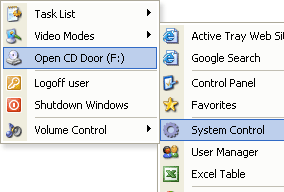
Active Tray lets you launch a favorite website, open a folder, or configure a hotkey for rapid access to a program. Imagine being able to create cascading popup menus containing your most important tasks! You can even add password protection and balloon tips to those popup menu shortcuts.
Each tray icon can now have individually defined settings, as can each popup menu. You can also change the overall appearance of the tray (icons, menus, separators, etc).
Active Tray is extremely intuitive; being both easy to learn and easy to use. It even comes with its own balloon tips support, and Windows XP users will appreciate the program's support for Windows XP themes.
The program has received excellent reviews from AllFiles.com, File Transit, Download Blast, and many other respected software review websites. Don't pass up this opportunity to download your free trial copy today, and see why so many others are raving about Active Tray!
Enter 'Active Tray', the Windows System Tray 'Super-Charger'! Now the System Tray can truly become what it was always meant to be.
Active Tray lets you launch a favorite website, open a folder, or configure a hotkey for rapid access to a program. Imagine being able to create cascading popup menus containing your most important tasks! You can even add password protection and balloon tips to those popup menu shortcuts.
Each tray icon can now have individually defined settings, as can each popup menu. You can also change the overall appearance of the tray (icons, menus, separators, etc).
Active Tray is extremely intuitive; being both easy to learn and easy to use. It even comes with its own balloon tips support, and Windows XP users will appreciate the program's support for Windows XP themes.
The program has received excellent reviews from AllFiles.com, File Transit, Download Blast, and many other respected software review websites. Don't pass up this opportunity to download your free trial copy today, and see why so many others are raving about Active Tray!
User comments