
Daily Reviews Team, 2005-05-13 01:10:10
Make your Windows operating systems much more convenient and effective in usage with the Actual Title Buttons tool.
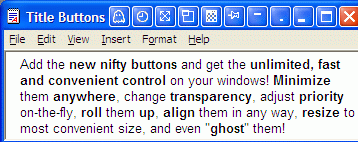
Windows options could have a lot of potential which can be unleashed using this unique add-on tool. Using this utility it is now possible to add various capabilities to Windows such as minimize to tray, make transparent, align Windows, stay on top, rollup or unroll or others. Multitasking becomes easier as the clutter on your desktop is reduced significantly by better managing the Windows features. You could trigger the new controls added by this tool either by specifying corresponding keystrokes or by adding Windows-styled buttons next to the standard buttons. Using this utility you can not only improve your operating efficiency but also improve the look of your desktop wallpapers which are visible through the transparent Windows.
You can try it for free to estimate the improvements it brings to your output.
Daily Reviews Team, 2002-05-08 01:10:10
With so many shell extension tools out there most people's systems are bound to be enhanced by tiny programs that can offer specific features. They usually come with a tray icon to look at when bored, and a resident file that eats some of your memory. Not all of these tools are worth mentioning, much less deserve installation and use.
Actual Title Buttons is an example of a useful shell extension application.
Actual Title Buttons is a tool that lets you add buttons with specific features to the application windows of your choice. There are but two buttons to choose from: Stay On Top and Minimize To Tray. The 'stay on top' feature brings the window to the top of the desktop and doesn't allow other windows to hide it partially or completely. The 'minimize to tray' option - a very useful thing indeed - lets you hide the current window to a tray icon so there's more space on the taskbar.
The buttons look just as the default buttons present in almost every application window: minimize, restore and close. They appear side by side the built-in buttons and react to the mouse cursor in very much the same way. You can add one or both buttons to any window and the program will remember your settings and invoke them every time you run it. Try this tool today and see for yourself.