


Editor's review
This piece of software that creates an on-screen keyboard of computing devices.
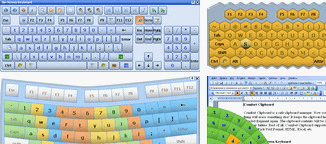
Comfort On-Screen Keyboard Pro is an application displaying a unique virtual keyboard on the screen. You are then able to use the mouse to type as with regular keyboard. This is suitable for use in ultra mobile PCs (UMPC), tablets and information kiosks. For typing on the virtual keyboard created with this application, the user does not need to look away from the keyboard or the display. This should save a lot more typos from happening. Neck and eye strain is avoided. It can be conveniently used as a shortcut reference for different applications; icons of these shortcuts are displayed. Work can be speeded up easily. If it is set for touch typing practice, the keys pressed can be colored. You are able to see what exactly you are typing, helps your training.
The displayed keyboard can be changed in appearance. Several choices about the position, size and number of keys, the color and the skin are available. Some variations are named, besides the on-screen keyboard, as editing keyboard, keyboard simulator, transparent keyboard, UMPC keyboard, honey keyboard, etc. Useful features across the appearance variants are auto complete, auto repeat, gestures features/functions etc. Quick switching between languages, display of characters in actual language, features help if you have to deal with more than one language. The keyboard templates are well designed, multi touch is supported, gestures function support is some more useful features. This is a really handy tool when you need an on-screen keyboard. You can also enter the keys by just hovering over a key to make things more comfortable, when this mode is set.
User comments