


Publisher's description
Intended for remapping keys, mouse buttons and mouse wheel actions, Key Remapper allows you to:
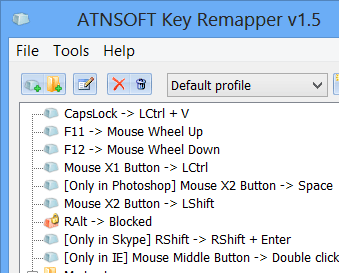
- Remap keys, mouse button presses and the mouse wheel rotation to different values and even to non-existing keys and mouse buttons. For example, you can replace CapsLock with "Middle mouse button", F11 - by "Mouse wheel down", F12 - by Win, Browser Home or "Mouse button X2" (which can be physically missing on your input devices).
- Perform reverse remapping of keys and mouse buttons, i.e. virtually change their functions. For instance, you can virtually swap the Right Shift and Enter keys, the "Middle mouse button" and the Left Shift key.
- Replace specific keys or mouse buttons by key or mouse button combinations with modifiers. For instance, you can replace the Browser Forward key (usually found on multimedia keyboards) by the Alt+Shift+Esc (quick switching between programs) combination, replace the X1 mouse button by the Ctrl+C (copy) combination, assign the Ctrl+"Left Mouse Button" combination to the right Alt key.
- Emulate double mouse button and key presses and set the necessary interval between presses (double click with a delay).
- Block (disable) keys, mouse buttons, the mouse wheel rotation and their combinations with various modifiers.
- Restrict remapping and blocking to specific programs and windows. For instance, you can configure the software to allow the replacement of the X1 mouse button by Space only in program A and nowhere else. Another example would be: allow NumLock to be replaced by the Ctrl+C+C (double press of the "C" key) combination everywhere except for windows with the word "B" in their title.
- Create and quickly (two clicks) switch between key sets.
The software does not alter the scan codes stored in the registry and does not require the system to be restarted in order to apply mapping changes.
- Remap keys, mouse button presses and the mouse wheel rotation to different values and even to non-existing keys and mouse buttons. For example, you can replace CapsLock with "Middle mouse button", F11 - by "Mouse wheel down", F12 - by Win, Browser Home or "Mouse button X2" (which can be physically missing on your input devices).
- Perform reverse remapping of keys and mouse buttons, i.e. virtually change their functions. For instance, you can virtually swap the Right Shift and Enter keys, the "Middle mouse button" and the Left Shift key.
- Replace specific keys or mouse buttons by key or mouse button combinations with modifiers. For instance, you can replace the Browser Forward key (usually found on multimedia keyboards) by the Alt+Shift+Esc (quick switching between programs) combination, replace the X1 mouse button by the Ctrl+C (copy) combination, assign the Ctrl+"Left Mouse Button" combination to the right Alt key.
- Emulate double mouse button and key presses and set the necessary interval between presses (double click with a delay).
- Block (disable) keys, mouse buttons, the mouse wheel rotation and their combinations with various modifiers.
- Restrict remapping and blocking to specific programs and windows. For instance, you can configure the software to allow the replacement of the X1 mouse button by Space only in program A and nowhere else. Another example would be: allow NumLock to be replaced by the Ctrl+C+C (double press of the "C" key) combination everywhere except for windows with the word "B" in their title.
- Create and quickly (two clicks) switch between key sets.
The software does not alter the scan codes stored in the registry and does not require the system to be restarted in order to apply mapping changes.
User comments