


Publisher's description
Computers can be really frustrating, especially when all of a sudden they become slow and start freezing up. Sometimes viruses and other malware can be the cause of this and if you don`t perform daily anti-virus scans, you might not discover the infection until it's too late. Another way of identifying malware is analyzing the list of running processes and finding out what each process does.
But most likely it's legitimate Windows processes and applications making life difficult. Some processes, like svchost.exe or lsass.exe, are known to consume 80%-100% of CPU and some applications, like Firefox, can use large amounts of RAM. Whenever this happens, your computer becomes a lot slower and might start freezing up.
That's why it's very important to know which processes are running on your system, how much CPU and RAM each process uses, and what each process does.
But imagine how tiresome and time-consuming it is to open the Task Manager, browse through the list of processes, and then spend a lot of time online researching what each of them does! Luckily, now there is an easier way to control Windows processes.
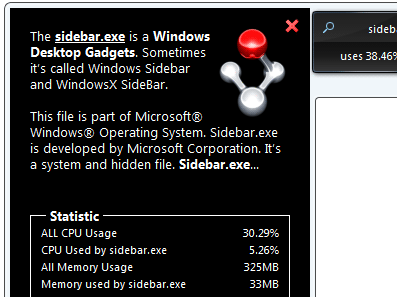
Fileinspect Sidebar Gadget is a free Windows sidebar tool that provides comprehensive information about the most resource-heavy processes running on your computer. It displays how much CPU and RAM each process uses. You can also view a detailed process description by clicking on the magnifying glass sign to find out whether that process is malware or a safe Windows process.
Fileinspect Sidebar Gadget will save you lots of time and trouble and help you be in total control of Windows processes.
But most likely it's legitimate Windows processes and applications making life difficult. Some processes, like svchost.exe or lsass.exe, are known to consume 80%-100% of CPU and some applications, like Firefox, can use large amounts of RAM. Whenever this happens, your computer becomes a lot slower and might start freezing up.
That's why it's very important to know which processes are running on your system, how much CPU and RAM each process uses, and what each process does.
But imagine how tiresome and time-consuming it is to open the Task Manager, browse through the list of processes, and then spend a lot of time online researching what each of them does! Luckily, now there is an easier way to control Windows processes.
Fileinspect Sidebar Gadget is a free Windows sidebar tool that provides comprehensive information about the most resource-heavy processes running on your computer. It displays how much CPU and RAM each process uses. You can also view a detailed process description by clicking on the magnifying glass sign to find out whether that process is malware or a safe Windows process.
Fileinspect Sidebar Gadget will save you lots of time and trouble and help you be in total control of Windows processes.
User comments