


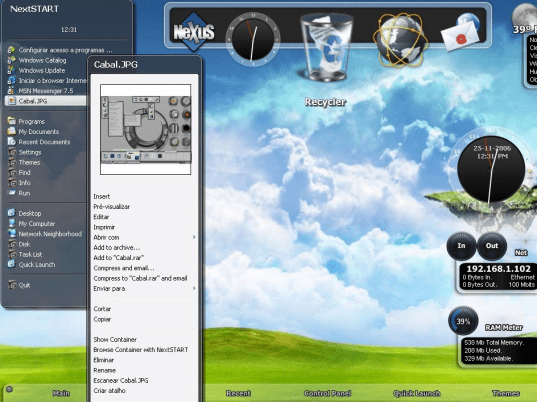
Publisher's description
NextSTART, by Winstep Software Technologies, is a powerful, skinnable, and dynamic pop-up menu that can be used as a replacement or supplement to the Windows Start Menu and taskbar. NextStart also offers an incredible amount of flexibility so that the user can customize it to his needs and desires.
Unlike many other menu programs, NextStart does NOT require you to re-enter the paths to all the programs listed on your Start Menu. NextStart will automatically read the directory structure of your Programs folder(s) and create a menu for you on the fly! In fact, thanks to NextStart's dynamic menu support, it will create as many menus as you wish based on any hard drive or directory!
NextSTART features built-in task management to control running apps and the Windows System Tray. Gain access to your running apps via handy task icons/tiles right on your desktop. Best of all, you can choose the position of the "task list", the style, and even which icons should be displayed for specific applications. NS also allows you to place the Systray anywhere on your desktop!
Not happy with the default NextSTART configuration? Would you prefer a menu system that emulated BeOS or Mac? How about transparent menus? No problem...You can configure how the menus look and behave! Choose where scroll-buttons are located, how menu selection is made, which mouse button activates the menus, assign hot keys and more! You can choose the font, the size, the colors (even use gradients and bitmaps with transparency!), 3D effects, custom icons and, still, more! In fact, thanks to the improved Theme support of the NextSTART Preferences Manager you can now import and export themes based on the above options. Download hundreds of FREE themes from http://themes.winstep.net !
Unlike many other menu programs, NextStart does NOT require you to re-enter the paths to all the programs listed on your Start Menu. NextStart will automatically read the directory structure of your Programs folder(s) and create a menu for you on the fly! In fact, thanks to NextStart's dynamic menu support, it will create as many menus as you wish based on any hard drive or directory!
NextSTART features built-in task management to control running apps and the Windows System Tray. Gain access to your running apps via handy task icons/tiles right on your desktop. Best of all, you can choose the position of the "task list", the style, and even which icons should be displayed for specific applications. NS also allows you to place the Systray anywhere on your desktop!
Not happy with the default NextSTART configuration? Would you prefer a menu system that emulated BeOS or Mac? How about transparent menus? No problem...You can configure how the menus look and behave! Choose where scroll-buttons are located, how menu selection is made, which mouse button activates the menus, assign hot keys and more! You can choose the font, the size, the colors (even use gradients and bitmaps with transparency!), 3D effects, custom icons and, still, more! In fact, thanks to the improved Theme support of the NextSTART Preferences Manager you can now import and export themes based on the above options. Download hundreds of FREE themes from http://themes.winstep.net !
User comments