

Free Downloads Center
e.g. GraFX Saver Pro 4.01

Latest Reviews

AirGrab WiFi Radar

AirGrab WiFi Radar
AirGrab WiFi Radar will display and give you access to the Apple Airport base stations and other WiFi wireless access points details.

RebootEx

RebootEx
b>RebootEx, a very smart and handy tool that will automate shutdown, power off, remote and specified time shut down, reboot or re-logon to your computer.

Subscribe

GraFX Saver Pro 4.01 Español: GraFX Saver Pro 4.01

GraFX Saver Pro 4.01

Editor's rating  
Users' rating   (4 votes) Rate it!
License Shareware / $75.00
Downloads this week 1369
Publisher CDH Productions
File size 4193K
Date added 9-Sep-2005
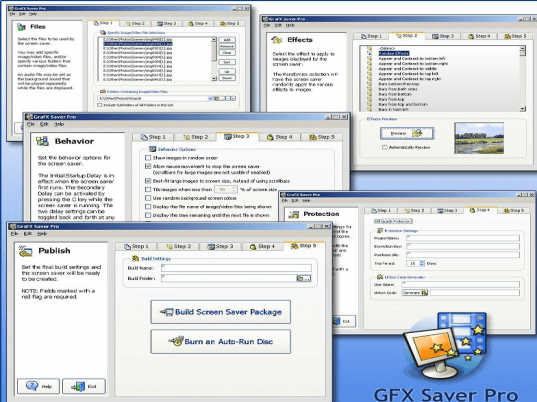
GraFX Saver Pro screenshot

Enlarge screenshot

Publisher's description
Editor's review
Submit your review

GraFX Saver Pro makes it easy to create professional screen savers in record time! The software supports over 20 image and video formats! It also supports all popular audio formats (MP3, WAV, WMA, MIDI, RMI, SND and AIFF) for background sound. Some of the image formats supported include BMP, JPG, GIF, PNG, EMF, WMF, DIB, PCD, PCX, PSD, PSP, TGA, TIF and more. The supported video formats are AVI, MPG, WMV, ASF and (if QuickTime is installed on the end-user system) MOV. The screen savers you create with GraFX Saver Pro are 100% royalty-free, and absolutely no programming is required. Use GraFX Saver Pro for presentations, tutorials, displaying company logos, video screen savers, photo screen savers and much more. GraFX Saver Pro's features include: over 100 special effects; complete control of size, order, transition, display time, background and more; quick and easy creation of trial version screen savers to sell; professional installations for screen savers, which makes setup easy for end users; previewing of image effects, complete drag & drop support, advanced zoom capabilities, and many customization options. You can create professional screen savers quickly and easily by selecting each tab on GraFX Saver Pro's intuitive interface. Start with Step 1, Files, to select the individual image and video files or the folders you want in your screen saver. You can also select an audio file to use as background sound. Go to Step 2, Effects, to choose from over 100 special effects for displaying files. Step 3, Behavior, allows you to customize your screen saver further. You can control how image/video files are displayed and in what order and apply various functionality settings. The next tab, Step 4, Protection, gives you the option to protect your screen saver, provide a trial version, create unlock codes for end-users, and enable online purchasing for your created screen savers. Finally, choose Step 5, Publish, to build your screen saver installation package.

Visit homepage of GraFX Saver Pro

Download GraFX Saver Pro 4.01

create video background wmv mpg psp audio formats video asf mov to wmv convertor quicktime to mpg converter convert 3gp video to wma video saver mov into avi tga video

Programs related to GraFX Saver Pro

Copyright © 2001-2007, Free Downloads Center.