

Editor's review
RightClick 1.2 tool provides easy accessibility to various items by altering the Desktop right-click menu. It replaces the default Windows desktop right click menu, with its own customizable menu. Henceforth, the application enables you to access various program, run different commands, along with adding different shortcuts in the right-click menu to get quick accessibility to different applications. You can alter its configurations with ease, as it runs while staying in the system tray and can be set to start with Windows. On its presentation part, the application can be changed according to your preferences, providing best suitability to your Windows theme. Even you need not launch the application every time from the icon or program menu, by setting a hotkey for the purpose.
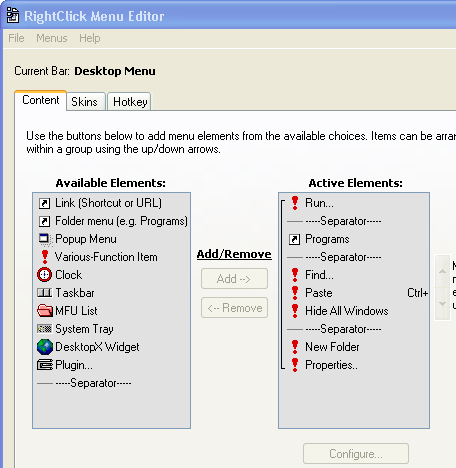
RightClick 1.2 tool essentially replaces your Windows default Desktop right-click menu with a new sophisticated customizable menu that can accomplish numerous functions. You can select a skin style to change its appearance and even you can add or remove any shortcut from the menu. The Content option on the program main screen let you select and add elements into the menu. Along with it you can set the elements sequence and alter each element’s label, function, appearance and shortcut key. The Skin option provides you the list of skins available and you can simultaneously see their preview and set the transparency level. With the third ‘Hotkey’ option you can assign a shortcut key for to bring your desktop menu. Further, you can enable/disable ‘General Options’ relating ‘Extended Feature Options’, and ‘Startup Options’. One of the interesting features of the program is that you can change the label with image or icon file and select an effect like mouse over for its appearance.
With the RightClick 1.2 desktop right-click menu, you would find it easier to access different programs, in addition to required shortcuts to the menu. 3.5 rating points is assigned to the utility for its smooth functionality and user-friendly feature-set.
User comments