


Editor's review
Today news websites on the internet has become a major source of information. Now if you like visiting news sites for updated information then there is a good chance that you spend a significant amount of time browsing through them. In order save your valuable time and yet get updated with latest events around you take the help of 2Flyer RSS Screensaver 1.0. The application is capable of presenting updated news RSS feeds from some pre-specified sites. It’s a fantastic screensaver that enables you reading blog posts and news RSS, while you are on a short off from your work. The screensaver displays the RSS articles, headlines, along with their original format and images. In addition, it also provides easily configurable settings to alter its different attributes. Moreover, the news or blog articles displayed by the screensaver can easily be visited on web, by pressing the Enter tab. Along with all these features, it is compatible to work with known feed formats like RSS, RDF and Atom.
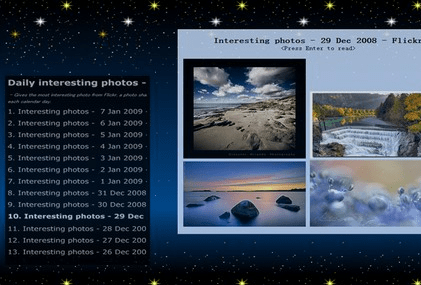
2Flyer RSS Screensaver 1.0 when installed at your system displays the ‘Desktop Settings’ for applying it as your PC’s default screensaver. The screensaver is displayed according to the set PC idle time, but can be previewed with ‘Test’ or ‘Preview’ options. Using the configurations you can easily add the RSS URLs to the list, which are displayed at the mid area of settings dialog window. Even the added sites can be marked to enable or disable their usage for extracting the RSS feeds. Moving on with the settings, the program provides options to make the selection of ‘Read Interval’, ‘Image Interval’, followed by ‘Background images folder’. Along with these features the configuration window also provides the info to pause the screensaver, move to previous/next item, and go to previous or next RSS. When the screensaver is launched, the list of RSS items is shown on the left accompanied by the related RSS presented on the right. Press Enter to visit the site for reading the complete news story.
2Flyer RSS Screensaver 1.0 provides you easy and interesting way of accessing updated news RSS feeds, thus saving your time. The screensaver utility earns a score of 4 rating points owing to its customizable configurations, impressive interface, and notable performance.
User comments