


Editor's review
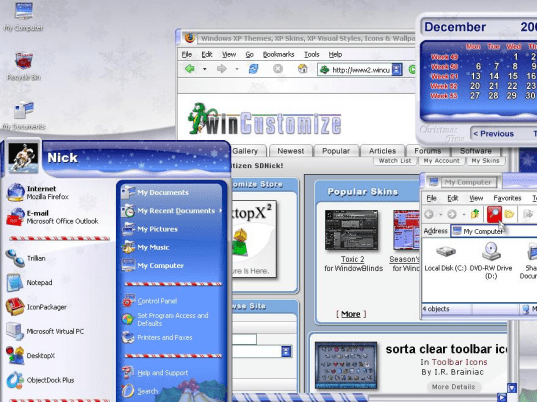
After a week-long tiring schedule, isn’t it great to come out of the work stress and enjoy your weekend with the excitement of holiday? Set holiday spirits all around and enjoy your weekend with full of energy. Well, when everything is reflecting the joyous holiday feel, why not your let PC reflect the same? This can be done by sporting various holiday-related themes on your desktop. If you’re looking for some cool themes for your Windows system, then Holiday Desktop 1.0 theme manager application can be useful for you. The utility facilitates modifying the title bars, menus, Start bar, Windows icon, along with adding a cheery calendar, and beautiful wallpaper to your PC desktop by applying a holiday theme.
By using the Holiday Desktop 1.0 you can apply a different theme for your PC desktop. With user-friendly console, the utility comprises of self-explanatory feature-set allowing you to make desired changes to your desktop. On the interface, you’re shown the different system themes listed with left pane, from which you can select and apply any on your PC. Highlighting the provided themes, their previews are displayed simultaneously at right side area. Giving a look to the preview you can easily decide which theme you want to apply to your system. Selecting a theme, you’re required to click the ‘Apply’ button provided below the preview screen. Now, as an immediate effect to it, the menus, start menu, wallpaper, etc are modified according to the chosen theme. However, the utility also associates Help option providing direct access to the online guide on who to get started with the program, system requirements, etc.
The Holiday Desktop 1.0 lets you apply enjoyable themes to spread over the holiday feel on your PC desktop. The utility deserves a score of 4 rating points for the striking functioning capability in applying theme style to windows, menus, title bars, start menu, icons, etc, accompanied with easily negotiable features.
User comments