
Free Downloads Center
e.g. Theme Manager 2.3

Latest Reviews

Visual Importer

Visual Importer
Visual Importer, the only versatile tool that can export, transform or load database data at the rate of 14,347 records per second.

AutoTRAX Design Express

AutoTRAX Design Express
AutoTRAX Design Express is a very useful Electronic Design Suite specially designed for Electronic Engineers.

Subscribe

Theme Manager 2.3 Download

Editor's rating  
Users' rating   (22 votes) Rate it!
License Freeware / $0.00
Downloads 85130
Publisher Stardock Systems
File size 2127K
Date added 29-Aug-2006
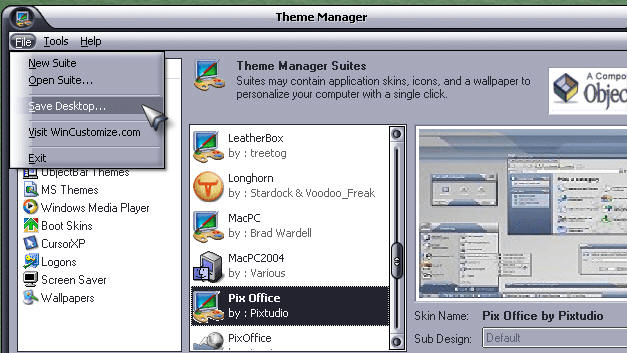
Theme Manager screenshot

Enlarge screenshot

Publisher's description
Editor's review
Users' reviews (2)
Submit your review

Control the OVER ALL look of your Windows computer with Theme Manager. Manage all your skins, themes, wallpapers, icons, etc. from a single interface. You can even mix and match them together to create full blown suites!

Theme Manager is a front end that seamlessly works with your other desktop enhancements to apply skins, themes, icon packages, and suites all from the same user interface. Once you have your desktop just the way you want, you can take a snapshot of your desktop that is saved as a .suite file.

Theme Manager supports:

- Wallpapers
- Visual Styles (WindowBlinds & MSStyles*)
- MP3 Players (Winamp, Windows Media Player, Cool Player)
- Desktop Themes (Microsoft .theme, DesktopX, Hoverdesk, NextStart, ObjectBar)
- Mouse cursors (both Windows and CursorXP)
- Logon Screens (LogonXP format)
- Boot Screens (BootSkin format)
- Icons (both MS Themes and IconPackager themes)
- Widgets (SysMetrix, DesktopX Widgets)
- Instant Messenging Skinning (Trillian, ICQ Plus)
- Launchers (ObjectDock, WorkShelf)
- and more!

Editor review: Reviewer, 2009-04-03 04:41:00

Control the OVER ALL look of your Windows computer with Theme Manager. Manage all your skins, themes, wallpapers, icons, etc. from a single interface. You can even mix and match them together to create full blown suites.

Pros: The theme manager can control the overall look and feel of the desktop. One can choose a suite that has all the visual component following a specific style or you could individually choose what you’d like to have as skins of various applications, themes, wallpapers and so on. Operating from a single interface one can mix and match items to create a complete suite. Once it is done one could take a snapshot of it as a .suite file and distribute the same to friends and family. Theme manage supports a series of items to generate these visual styles.

These include wallpapers, visual styles (WindowBlinds & MSStyles*), MP3 Players (Winamp, Windows Media Player, Cool Player), desktop themes (Microsoft .theme, DesktopX, Hoverdesk, NextStart, ObjectBar), mouse cursors (both Windows and CursorXP), logon screens (LogonXP format), boot screens (BootSkin format), icons (both MS Themes and IconPackager themes), widgets (SysMetrix, DesktopX Widgets), instant messenger skins (Trillian, ICQ Plus), launchers (ObjectDock, WorkShelf) and so on.

Main part of the interface lets you choose the theme from out of a set available in the library. One can have a look at the pre-view window to decide what you like. On the other side you can choose things a-la-carte from out of suites, visual styles, icon packages, desktopX packages, ObjectBar themes, Windows Media Player, Boot Skins, Cursor XP, logons, screensaver and wallpapers.

Cons: Personally I think this is much ado about nothing much but if you have the time and inclination this could be a good tool to doll up things. The pictures in the interface do not look good may be because low resolution images have been used.

Overall: Easy to use package it is good for 3 stars at least.

Visit homepage of Theme Manager

Download Theme Manager 2.3


player manager
desktop snapshot
system suites
create themes for nokia
creating themes
theme cool
vista xp themes
themes of computer
ogg player skins
windows plus themes

Programs related to Theme Manager

Copyright © 2001-2009, Free Downloads Center.