


Editor's review
Protect your PC from abusive use of removable media and enforce whether your users are allowed to use removable media or access your local drives. 1st Disk Drive Protector lets you hide, lock and prevent usage of local, network, Floppy and USB drives as also disable “autorun” feature on them.
Pros: Removable media, be it a hard disk locally or on a network , floppy and USB drives can be misused. One could simply access these and copy away crucial data quite easily. This application is able to protect you from such misuse. This software will easily help you enforce whether other users are allowed to use removable media or access your local drives. You could make these invisible so that these drives are locked out of access and thus cannot be used. It is also possible to disable the “autorun” feature on these devices you choose. This significantly reduces the possibility anyone is able to install undesirable software or clutter up the drives on your system leaving you with the chore of cleaning up the mess.
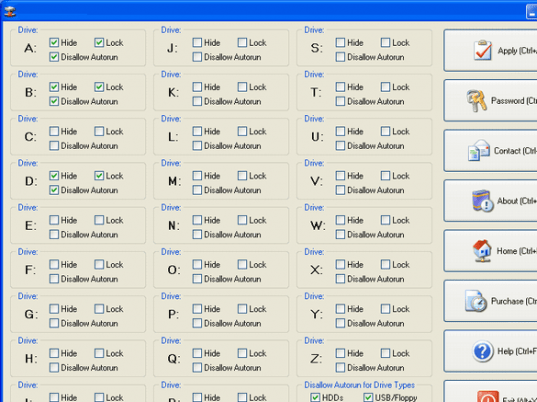
The interface could not have been simpler. It lists all the possible drive names. Each has three options of locking up, hiding and disabling autorun. The user just click the check boxes for the features to be enabled. You could disable autorun on a group of devices. The allowed types are HDD, USB/Floppy, CD/DVD or RAM Disks. A click on the Apply box enables the protection right away. Write protection on removable devices can be set as a whole as an additional feature. A password protection can be applied to the program to prevent your users form changing the security settings you enforce.
Cons: No problematic issue here.
Overall: Really very simple and easy to use program for the security of a specific type. This one is a 4 star package alright.
User comments