
Free Downloads Center
e.g. Disk Drive Administrator 3.22

Top in this section

Spytech Spylock

Spytech SpyLock is a powerful and easy-to-use software utility that al...

Latest Reviews

Vitascene Starterkit

Vitascene Starterkit
Vitascene Starterkit is a professional tool that allows to manage and enhance the effects and transitions of images.

eCover Engineer

eCover Engineer
eCover Engineer, the professional tool that allows you to create outstanding eBook covers, CD covers, DVD covers and software box covers.

Subscribe

Disk Drive Administrator 3.22 Download

Editor's rating  
Users' rating   (2 votes) Rate it!
License Shareware / $39
Downloads 7603
Publisher IM-Soft
File size 600K
Date added 29-Sep-2009
Disk Drive Administrator screenshot

Enlarge screenshot

Publisher's description
Editor's review
Users' reviews (1)
Submit your review

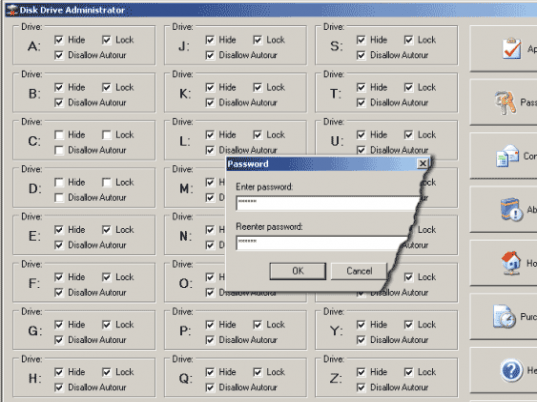
Disk Drive Administrator - hide, lock and protect your local, network, Floppy and USB drives, and disable the AutoRun feature for them using this fabulously designed software. Functionality and simplicity is put in every corner of the program; intuitively understandable user interface gives you an ability to start using the program right out of the box without learning anything. All you need to do is to click on the checkboxes located within the group boxes representing individual drives. Another great feature you can use lets you disable the AutoRun feature based on drive types. This means you can disable, for instance, only all USB drives, regardless of the drive letters that can be associated with them. The program lets you protect itself from an unauthorized access by assigning a password that can be requested on each program start.

Editor review: Reviewer, 2009-04-28 05:38:00

Disk Drive Admin - hide, lock and protect your local, network, Floppy and USB drives, and disable the AutoRun feature for them. Disable the AutoRun feature for individual drives or based on drive types to disable, for instance, only all USB drives.

Features: Disk Drive Administrator lets you hide, lock and protects all the drives you are in charge of. The drives can be your local, network, Floppy and USB drives. Functions that can be used on each of the individual drive or as a group are hide, lock and protect. Protect function stops AutoRun from that particular drive or that particular group of drives. The user interface is straightforward and does not need any learning time. You can become productive straight out of the box.

The interface is essentially a straight listing of all the drive designations possible; A to Z. For each drive designation three options are provided through check boxes. These check boxes are for "Hide", Lock" and "Disable AutoRun". On a separate rectangle in the interface page you have the Disable AutoRun function for groups of devices; HDD, USB/Floppy, CD/DVD and RAM disks. One side of the interface area has several buttons arranged vertically. These let you apply the changes you made, ask for a password change, contact, about, home, purchase, help and exit. The password protects access to the software. If a password is changed you will have use it the next time the program comes up. The program is compatible with Windows 98/ME/NT/2000/XP/2003 and Vista.

Overall: A good utility for a very specific function.

Visit homepage of Disk Drive Administrator

Download Disk Drive Administrator 3.22


start disk
usb flash lock
usb file lock
autorun usb
usb over network
usb drive repair utility
floppy drives
hide drives
usb password protect
virtual usb drive

Programs related to Disk Drive Administrator

Copyright © 2001-2009, Free Downloads Center.