
 |
 |
|
|
 |
 |
 |
 |
|
|
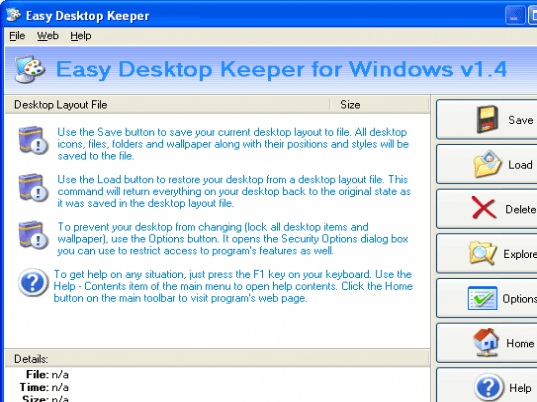
Easy Desktop Keeper gives you the ability to save, restore, manage and lock your desktop layout including files and folders located on your desktop, placement of desktop icons, desired wallpaper and screen saver. If you choose to lock your desktop layout, every time you reboot your PC, the program will restore your desktop icons and bring them back to their original positions as well as return your old wallpaper and screen saver to the background. You can create an unlimited number of desktop layouts for different purposes such as gaming, working, surfing the Internet as well as provide different users with their own desktops. Simply place your icons wherever you want them on your desktop, select desired wallpaper and screen saver, double click program's tray icon and click the Save button to create a new desktop layout file. If your icons ever get moved or deleted by any user or after entering the safe mode or changing the screen resolution, just open the program and click the Load button to return your desktop to any previously saved state, or simply reboot your PC if you are in the Lock Desktop mode. Many of you, after meticulously arranging all the icons on your desktop, have been frustrated to no end when somebody else or Windows itself randomly re-arranges them. It is getting more frustrating when you get your icons deleted from your desktop without an ability to recreate them back. System administrators working in educational institutions will realize that Easy Desktop Keeper is just a must for their PC labs because it can be easily used to stop pesky students from changing desktop wallpaper, deleting desktop icons and so on. This easy-to-use utility will give you new exciting abilities to manage and secure your desktop; you'll get rid of a lot of headaches, and get a peace of mind.
|
|
Editor review: Reviewer, 2008-09-15 08:03:00
If you have a desktop computer at your home, then the idea of ‘Personal Computer’ (PC) may not hold good for you, as your PC will frequently be accessed by your family members. Sometimes this unwanted access really proves to be really agonizing for us, as the users often tend to change your desktop settings, like wallpapers, icons, screensavers, and other such entities. This becomes irritating as it takes time and efforts to save all the changes to what you had set. Now you can easily keep a check on your desktop layout by using the Easy-Desktop Keeper 2.34 application. The program is an integration of various useful features to lock, save, manage and restore, the desktop layout whenever required.
Easy-Desktop Keeper 2.34 is a small utility which makes it an easy task to shift back to your desired desktop layout, even if someone has made the changes. The application when launched, stay at the system tray, and you can the program by right click on the tray icon. The right side menu of the program consists of all the options that you need to work with. With the given ‘Save’ option, you can easily save the current layout applied to your desktop in the form of a file. Saving the desktop layout, the application includes the icons, wallpapers, folders, and files, along with the style and position. Whenever you want to restore the desktop layout file, use ‘Load’ button, which will roll back the desktop layout to original state, you had set it to. If, further you want to prevent everyone from changing any thing at your desktop, you can try the Locking feature. Check out the stored files using ‘Explore’ option. Options present the features for setting the security to lock the desktop. Further if you need any information relating to the program or the features, you can take the assistance of the Help file.
The Easy-Desktop Keeper 2.34 application supports easy saving and restoring of the desktop layout, which justifies its usage at various places like educational institutions, where students often tend to change the wallpapers, remove icons, etc. For the well-planned and easy features, and the simple restoring process, the application is rated with 3 points on the scale of 5.
|
 |
 |
Visit homepage of Easy-Desktop Keeper
Download Easy-Desktop Keeper 2.63
Popular search terms related to Easy-Desktop Keeper:
peace, educational, return, mind, deleted, lock, layout, safe, restore, stop
|

desktop icon save create your own desktop wallpaper create desktop icons desktop lock how to lock folders how to lock internet create own screen saver lock icons desktop desktop icons restore restore ie icon

Programs related to Easy-Desktop Keeper
360 Monitor allows you to monitor employee's activities on all network computers, such as email, instant message, keystrokes, FTP file transfer, websi...
360 Spy Software lets you know EXACTLY what others do on your PC while you are away. It secrectly logs all keystrokes typed, all chats and instant mes...
With the influx of portable storage devices and removable media, data theft is becoming an increasing threat to organizations. Devices such as USBs, W...
ActivityMon is employee monitoring software which allows monitoring of keystrokes, takes screenshots of the user desktop or currently active window, s...
Advanced Run is the most powerful and free launcher that allows you to run any program, run any command line command, open and edit and print document...
Have you ever wondered what your spouse, kids or employees have been doing on the computer and Internet? Is your spouse engaging in online sexual conv...
Thank you for choosing AppLocker™, one of the top tools developed by Smart-X Software Solutions expert team in an effort to optimize your everyday wor...
An automatic Backup, Restore solution!
Insert any USB storage device into your computer and the software automatically copies your files to and fro...
|