

 |
 |
|
|
 |
 |
 |
 |
|
|
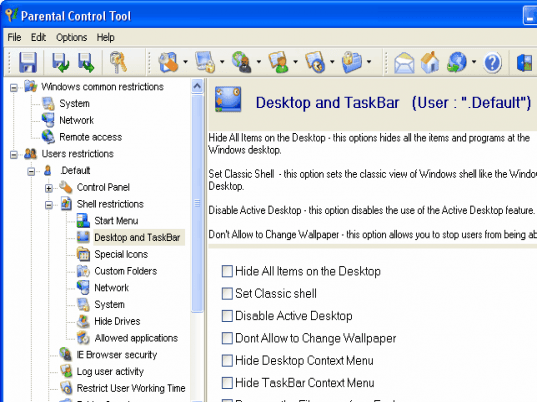
Parental Control Tool is a powerful security utility that allows you to restrict access to Windows important resources. This easy-to-use utility helps you to keep your computer in order. It enables you to impose a variety of access restrictions to protect your privacy. You can deny access to each individual component of several Control Panel applets, including Display, Network, Passwords, Printers, and System. You can disable your boot keys, DOS programs, Registry editing and network access. You have got an ability to hide your desktop icons, individual drives, Start menu items and the taskbar features, it enables you to stop others from tampering with your desktop. If you set up the special list of allowed applications nobody will run unwanted programs. The powerful feature 'User Working Time' allows you to limit working time for your children , office colleagues , students and so on. You can define several time intervals and time durations to manage users working time very easy. Parental Control Tool supports Internet Explorer security that enables you to customize many aspects of the Internet Explorer Web browser. It lets you disable individual menu items, prevent others from editing your Favorites, disable individual tabs in the Internet Options dialog, restrict access to the IE browser options. Also the program can log WHO and WHEN uses your computer to the special log file , so you always know who has used your computer. The administrator password prevents anybody to run the program and change settings and uninstall the program. The 'Import/Export' function helps you set up the same settings on several computers very easy.
Security restrictions can be applied universally or just to specific users because Parental Control Tool has got the multiuser intuitional interface.
|
|
Editor review: Daily Reviews Team, 2007-02-03 01:10:10
Parental Control Tool will take control over the user access to Windows important resources and keep the parents at ease.
As the name suggests this advanced tool will control the user by restricting access to Windows important resources. The tool has the capability in enabling a variety of access restrictions to protect your privacy. Important Control Panel applets like; Display, Network, Passwords, Printers, and System can be denied for access. It also allows the user to disable boot keys, DOS programs, registry editing and network access. The other features included are hiding of; desktop icons, individual drives, Start menu items and the taskbar features. The tool also supports an important feature that allows the user in setting working time limit, define several time intervals and time durations for children, colleagues, and so on.
The tool also supports; Internet Explorer security, special log file, administrator password, Import or Export function and more.
|
 |
 |
Visit homepage of Parental Control Tool
Download Parental Control Tool 7.5.3.3
Popular search terms related to Parental Control Tool:
restrictions, restrict, applets, printers, administrator, internet privacy, boot, children, prevent, privacy
|

parental controls control parental parental filter boot order audio editing tool vista boot tool dos utility restrict user internet access access control list parental block

Programs related to Parental Control Tool
Monitor network connections to your shared resources, find out who opens your files over local network. Protect your computer or file server, be notif...
Track activities from all computer users: data typed, sites visited, applications launched etc. With this easy-to-use spy software you will learn more...
Tired to lose your desktop icons and get them rearranged? Tired to roll back your desktop wallpaper and screen saver after other users you share your ...
Protect your PC from abusive use of removable media with 1st Disk Drive Protector. This software will easily help you enforce whether your users are a...
Protect PC, restrict access to Windows applications and password-protect boot with 1st Security Administrator. This is the best password-protected sec...
Restrict access to Windows applications, protect PC, and password-protect boot with 1st Security Administrator. This is the best professional password...
360 Monitor allows you to monitor employee's activities on all network computers, such as email, instant message, keystrokes, FTP file transfer, websi...
360 Spy Software lets you know EXACTLY what others do on your PC while you are away. It secrectly logs all keystrokes typed, all chats and instant mes...
This product expands apon the concepts orginally introduced in our 3D Render and 3D Gallery products
The Gallery Generator Feature now allows you to ...
|