
Free Downloads Center
e.g. Windows Security Tweaker 7.5.2.2

Top in this section

Spytech Spylock

Spytech SpyLock is a powerful and easy-to-use software utility that al...

Latest Reviews

Animated Wallpaper Maker

Animated Wallpaper Maker
Add life to your desktop, decorate it with self created animation wallpapers with the help of Animated Wallpaper Maker.

Pimero Free Edition

Pimero Free Edition
Pimero Free Edition, perfect for private use this program will manage and organize all your personal information, appointments, emails, contacts, tasks and notes.

Subscribe

Windows Security Tweaker 7.5.2.2 Download

Editor's rating  
Users' rating   (1 votes) Rate it!
License Shareware / $34.95
Downloads 402
Publisher Privacy Firewall
File size 1578K
Date added 10-Feb-2009
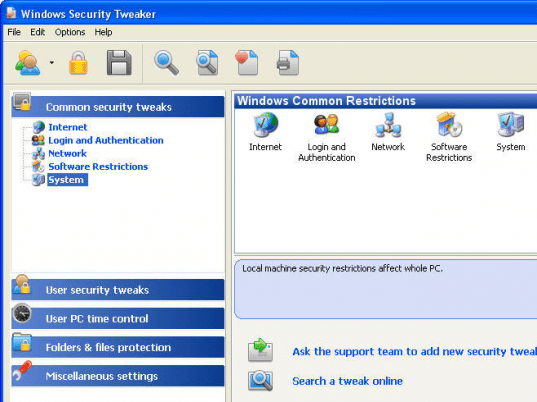
Windows Security Tweaker screenshot

Enlarge screenshot

Publisher's description
Editor's review
Submit your review

Windows Security Tweaker is an autonomous provider of log-on and resource restriction security application integrated with, yet independent of, the Windows operating system. It has the capability of providing extremely strong, secure control of who can access a personal computer resources, and exactly what they can do and when they can do it while they have access to those resources. If a user's time limit has been set and it has been reached, the computer shuts itself off and that user can not log-on again until their permitted time range arrives. Windows Security Tweaker enables you to protect and totally control access to your personal computer. It offers administrative support for controlling which users are allowed to access your computer and the level of access each user may have. You can choose to restrict access to several Control panel applet functions, including Display, Network, Passwords, Printer, and System. It's not an "all or nothing" restriction -- for example: you can allow a particular user access to your wallpaper settings but not allow him to change your screen saver. You can also assign separate system profile folders to each user, providing each with his own custom desktop. You can additionally: disable Start menu items, hide your drives, disable the DOS prompt, hide desktop icons, and much more. You can even set an access timer for each user (when and how long access will be allowed) and allow access only to programs on your personal computer that you place on an accessibility list. It allows you to manage CD-ROM usage. You can create the CDs List and set what CDs the user can access. New powerful feature "Folders Guard" can help you keep your files protected. You can choose who gets access to what files on your computer. This program provides two levels of protection to suit any user : "Hidden" and "Read Only". It is a powerful program that is trusted and used by people at home, in schools, colleges, universities and offices !

Editor review: Reviewer, 2008-04-08 06:42:00

At times when our PCs are being shared, we may get worried about the files and the personal applications that you have in it. Well now one can get over from your worries with the help of the Windows Security Tweaker 6.9.6.3. It gives you complete control over the applications, folders, files, etc in your PC. It is an application that gets integrated with the Windows operating system. With the help of the application one can set up options for controlling access at your PC ensuring comprehensive security. It also enables you to restrict the time limit for each user after which they can not use the system until the set time period arrives. Set the restriction for different functions like Control Panel, Display, Network, Printer, Passwords, and System. It also helps you to restrict the CDs that can be accessed by the user.

The software Windows Security Tweaker 6.9.6.3 provides you with various functionalities. The software shows up with simple interface that has the features that can be used easily by any normal user. The left side shows the functions that can be restricted or limited for the users. These are set with the expandable menu from where it’s easy to get access to other containing functions, files and folders for setting the restrictions. The right side of the screen shows the settings that can be enabled or disabled for the users according to your requirements. You can place restrictions by making the specified selections according to the provided features; Windows common restrictions, User restrictions, IE browser security, Restrict user time, etc. Yu can have the folders restricted to protect your files with Folder Guard and have the record of the user activity with the log file that prepared by the program.

Windows Security Tweaker 6.9.6.3 helps you to have over all control over the system and make the specific functions available for the users. Rated with 4.5 points on the scale of 5 the software is capable of restricting mall that you do not want to be accessed by others whether it’s an important file or the display of your desktop.

Visit homepage of Windows Security Tweaker

Download Windows Security Tweaker 7.5.2.2


user access control
internet restriction
personal time log
windows tweaker
create cds
convert foxpro to access
easy cds
hide dos windows
access of computer to computer
lan desktop access

Programs related to Windows Security Tweaker

Copyright © 2001-2009, Free Downloads Center.