
 |
 |
|
|
 |
 |
 |
 |
|
|
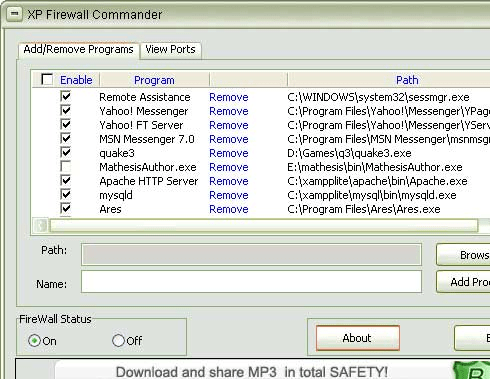
XP Firewall Commander is an easy to use control interface for your Windows XP built-in firewall. By default, Windows Firewall is turned on for all network interfaces. This helps improve network protection for new Windows XP installations and Windows XP upgrades. Windows Firewall also helps improve protection for new network connections.
XP Firewall Commander lets you add and remove exceptions for programs and services so that they can receive inbound traffic.
You may find it useful to use Windows Firewall with no exceptions when you connect to a public network, such as a public network at an airport or hotel. This setting can help protect your computer because it blocks all attempts to connect to your computer. When you use Windows Firewall with no exceptions, you can still view Web pages, send and receive e-mail messages, or use an instant messaging program.
In order to see what exceptions are enabled, XP Firewall Commander offers a separate tab called Add/Remove Programs. You can easily add a new exception by browsing for the executable file and providing a name. Just as easy you can select one of the active exceptions and click Remove.
If you need to allow specific inbound traffic, XP Firewall Commander also allows you to define a specific port and protocol (UDP or TCP) or a suitable port name.
The Firewall Status area permits you to instantly turn on / off the firewall. This feature should be used whenever you want to block all inbound connections to your computer. Turning the firewall on gives you a good protection against internet security threats such as worms, port scans and remote exploit attempts.
|
|
Editor review: Reviewer, 2008-11-01 07:20:00
A tool to control the Windows XP firewall.
Pros: XP Firewall Commander is a tool to manage the settings on your Windows XP Firewall. The interface allows a user to turn the Firewall ON / OFF as well as allows for fine tuning of the Firewall options – setting up exceptions, turning them ON or OFF according to the situation, blocking certain kinds of traffic / connections, blocking / allowing ports and more. An Add / Remove tab allows for easy viewing of all current exceptions and easy removal and addition of more.
Cons: The interface does not do anything more than is done by the standard firewall control in Windows XP. Although there is some finer level of control, in effect these are available through the “custom” setting in the standard control. So it really seems like the tool doesn’t do much in terms of providing additional functionality. That being the case, the tool really ought to make a case for a much better interface (easier, more intuitive). But the fact is that it doesn’t have a great interface, in fact it should be called poor. It is also inexplicable for first time users. There also doesn’t seem to be a way of setting up pre-configured protection modes, so that when you connect to a network you have to invoke the commander instead of making a simple selection of mode.
Overall: 3 stars. It allows for some finer level of control than is readily apparent on the Windows XP Firewall standard control. But in some senses is overkill because for the average user the standard control is enough, and advanced users will figure out how to find the required functions on the standard control.
|
 |
 |
Visit homepage of XP Firewall Commander
Download XP Firewall Commander 3.9
Popular search terms related to XP Firewall Commander:
windows commander, worms, firewall, public, remote control, messaging, traffic, blocks, block, instant
|

add remove for good computer commander remote control firewall firewall plus firewall with web filter dvd remove copy protection airport inc norton commander for windows user friendly firewall port connect

Programs related to XP Firewall Commander
Monitor network connections to your shared resources, find out who opens your files over local network. Protect your computer or file server, be notif...
Tired to lose your desktop icons and get them rearranged? Tired to roll back your desktop wallpaper and screen saver after other users you share your ...
360 Monitor allows you to monitor employee's activities on all network computers, such as email, instant message, keystrokes, FTP file transfer, websi...
360 Spy Software lets you know EXACTLY what others do on your PC while you are away. It secrectly logs all keystrokes typed, all chats and instant mes...
With the influx of portable storage devices and removable media, data theft is becoming an increasing threat to organizations. Devices such as USBs, W...
ActivityMon is employee monitoring software which allows monitoring of keystrokes, takes screenshots of the user desktop or currently active window, s...
Your PC keeps records of both your online and off-line activity. Any of the Web Pages, Movies, Pictures, Sounds, E-mail and Everything Else you have e...
Advanced Run is the most powerful and free launcher that allows you to run any program, run any command line command, open and edit and print document...
Outpost Security Suite Pro is a robust Internet security solution that proactively protects SOHO users against a broad range of current and future thr...
|