


Editor's review
With the increasing use of internet in our day-to-day life, we often fall prey to unauthorized intrusion and usage of our net connection. You may often see this case with your employees and even kids that they have been using internet excessively, mainly in your absence. Excessive usage of internet can affect your employee’s performance, and chances exist of your kids visiting inappropriate sites. So as to prevent any unauthorized access or misuse of internet, you can apply password protection and even restrict the access to different websites and programs for different users. For performing this function, you need not search anymore but simply try out iNet Protector 3.51. It’s a beneficial tool as it supports the users to place restriction on web access, and apply password protection to internet connection. It has the ability to let you manage different settings for specific time, users, and block or give access to particular applications and websites.
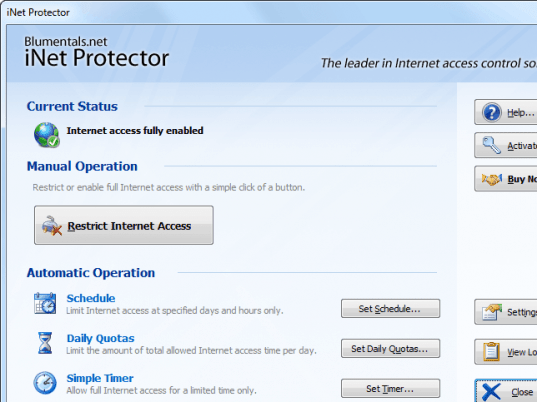
iNet Protector 3.51 is a small application that includes simple and self explanatory features to work with. The main interface of the application presents different features that are; Enable/Disable Internet, Schedule, Daily Quotas, Set Timer, Settings, View Log and Help. The first option on the screen helps you to enable or disable the internet access on your PC for specific users. Moving on to the next feature, ‘Schedule’, you can mark the hours in weekdays for which internet connection would be blocked. You can select custom interval and also set the schedule for individual users accounts. Setting this, you can set the ‘Daily Quotas’ that lets you to decide the number of hours that different users can spend on internet on each day. Next is the ‘Settings’ option that allows users to set password and options; specify the programs, services, sites, and IPs that are allowed, and mention the sites that have been blocked. The application stays at system tray ensuring easy accessibility.
iNet Protector 3.51 ensure safe and limited usage of internet, and prevents your internet connection and applications from unauthorized access. The program is assigned 4 rating points for its conveniently usable set of features that facilitates proficient functioning of the program according to the set preferences.
User comments