
Free Downloads Center
e.g. Comodo SecureEmail 2.5.0.23 Editor review

Top in this section

R-Studio

Data recovery tool for FAT, NTFS, Ext2FS file systems. File recovery after FDISK, MBR destruction, FAT damaged, virus infection. Dynamic disk support. Damaged RAID reconstruction.

Latest Reviews

CoffeeCup InstaWeb

CoffeeCup InstaWeb
CoffeeCup InstaWeb is an amazing program to instantly create personal or professional photos Websites with minimum efforts.

PDF Converter Pro

PDF Converter Pro
With high speed and quality convert various types of file formats to PDF files format with, PDF Converter Pro.

Subscribe

Comodo SecureEmail 2.5.0.23

Editor's rating   Comodo SecureEmail screenshot

enlarge screenshot

Users' rating   (2 votes) Rate it!
License Freeware / $0.00
Downloads this week 138
Publisher Comodo Security Solutions, Inc.
File size 6710K
Date added 20-Apr-2011
Publisher's description
Editor's review
Submit your review

Reviewer, 2008-12-08 07:27:00

Comodo SecureEmail protects your email messages from being intercepted, read or altered on their way through the Internet. The confidential information from the sender cannot be stolen and the recipient is assured that the message is authentic.

Pros: Unencrypted, plain text emails can easily be intercepted, read and edited. However if the security implemented is difficult to use it’ll never be used. This application provides a easy means of implementing suitable protection for e-mails inside and outside of your organization. It is a install-and-forget PKI based application that automatically encrypts and signs all outgoing messages. It is fully integrated with Outlook, Thunderbird and other major mail clients. It features a built-in wizard that allows users to easily download and setup a Comodo e-mail certificate. Users will benefit from the security of automatic encryption and signing of their email while the application handles difficult or hard to remember processes such as public-key exchange. This client-to-client email security application can complement gateway encryption applications which overlook the vulnerability of emails being exchanged within the network. Comodo SecureEmail automatically secures your email messages so that the message and its attachments cannot be intercepted, read or altered on its way through the Internet.

Digitally signing a message proves to your recipient that the message came from you.

Single use or onetime session certificates are used when appropriate. The recipient can decrypt and read the email by using the easy-to-use Web reader service. This enables to encrypt the mail for anyone at anytime.

Cons: It is difficult to comment on how strong or unbreakable the encryption is. Look out for actual evaluation data from some dependable sources before using it for use in your organization.

Overall: Very simple to use this application meets a need through a simple configuration. This is good for a 3 star rating at least.

Reviewer, 2008-11-24 08:36:00

Emailing has turned out to be the most reliable and effective way of setting up communication for a variety of purposes, ranging from professional to personal. But, the soaring usage of email for transferring crucial data is making it vulnerable to malicious hacking attacks. In such a situation, it becomes unsafe to send open documents via emails, and most of the well-informed email users prefer sending encrypted attachments with their emails. Concerning the requirement of email encryption, an application that can be relied upon is Comodo SecureEmail 1.1. The program serves you by encrypting and digitally signing your emails, making them secure to send over the internet. The easy operability of the program ensures simple yet effective security of your emails, by preventing unauthorized people from intercepting, reading or modifying them while being transferred.

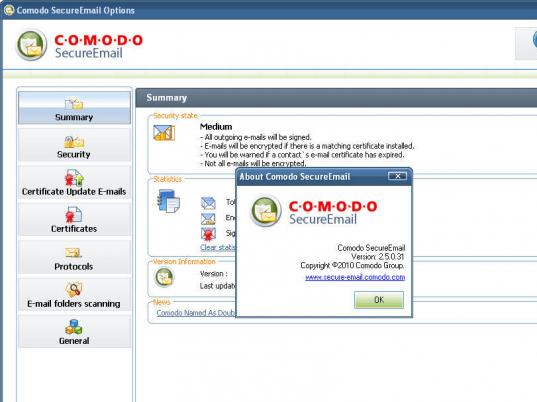
Comodo SecureEmail 1.10 is an easily operable program that supports email message and attachment encryption for data safety. The encrypted email can be seen only by the recipient as it encrypted and digitally signed, which results in unadulterated delivered email. Even you need not worry about the email application that you’re using as it is compatible to work with Thunderbird, Outlook, Incredimail, and different other POP, IMAP and SMTP based mail clients. Using the application you just need to follow the process with the wizard. First you need to sign up and receive the ‘Personal Secure Email Certificate’. Installing it, you need to set the configurations with the ‘Options’ window. The left panel presents different options to set the program functioning and process; these are Encryption, Digital Signing, Decryption, Certificate Update E-mails, Certificates, Protocols, E-mail folders Scanning and General. Using encryption set the program to encrypt emails automatically or as per specifications. You can opt to sign emails, set automatic decryption, add notification to recipients for email certificate, record the recipients with certificate info, and more. Apply and click ‘Ok’ and the application start performing as per specifications.

Comodo SecureEmail 1.1 application provides effectual assistance in safeguarding your E-mail content, by encrypting and digitally signing it, and comes loaded with a easy set of options. A score of 4 rating points is assigned to the program, for its convenient procedure, and easy-to-set configurations that runs the program as per the user’s specifications.

Visit homepage of Comodo SecureEmail

Download Comodo SecureEmail 2.5.0.23

Software related to Comodo SecureEmail

Copyright © 2001-2008, Free Downloads Center.