


Editor's review
Navigating to the folder through explorer every time is a redundant activity when you refer to some files everyday. AutoDialogs helps you to set your most often use folder to easily access from your system tray. With single mouse click you get access to your required folders.
Features: After installation AutoDialogs application stays in your system tray. Application is nicely designed and developed considering the need of every user. It is a simple and easy to use application, it doesn`t require computer expertise. You need to follow simple steps to add folder for easy accessibility.
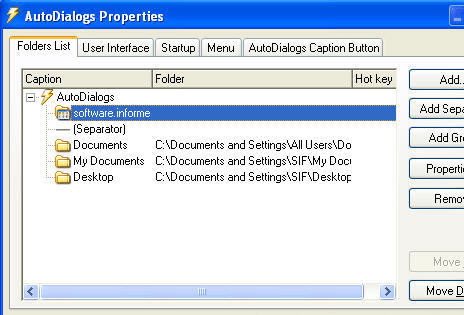
In the first step, add a list of your commonly accessed folders with caption, full path to the local or network directory and define a hot key if you wish. You can add separator, group for your accessible folder to display in your tray list as you wish. You can add, remove or change folders in the AutoDialogs menu by right-clicking its icon in the tray and selecting the Properties menu. Application allows you to setup startup activity as "Load AutoDialogs at startup" and "Show icon in system tray". Application also allows you to set caption button such as enable button in windows Explorer, it will display a button on your windows explorer, Enable button in Registry editor, use new caption button style etc. It supports Microsoft Office 95/97/2000/2003/2007/2010 applications, Windows Explorer, Registry Editor, Seagate Backup Exec software and others.
Overall: It is a good and easy to use utility for quick access to your folder from anywhere.
User comments