
 |
 |
|
|
 |
 |
 |
 |
|
|
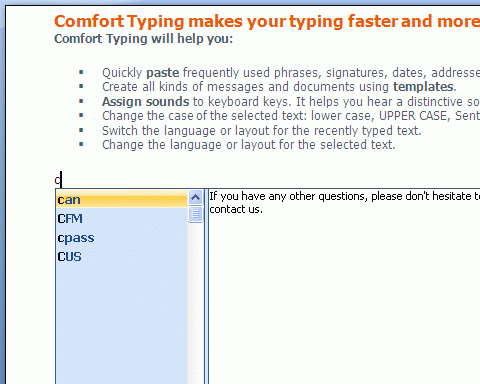
Comfort Paste is a template manager you can use to quickly paste frequently used text fragments and images.
Why do you particularly need Comfort Paste?
Despite the visible simplicity of the interface, Comfort Paste has powerful features that will help to forget about the routine of your work and speed it up.
Comfort Paste will help you to quickly complete the following tasks:
+ Paste frequently used phrases, signatures, smiles, addresses, greetings, passwords, etc.
+ Create all kinds of messages and documents using templates.
+ Paste images from a predefined list.
+ Paste regularly repeated fragments while programming: HTML, SQL, Pascal, etc.
How does Comfort Paste work?
Every template has a name and the manager searches the database for it. Just type the name of the template or only its beginning and press Win+Space (by default).
There are three types of templates:
1. Plain text.
2. RTF (Rich Text Format) - as in MS Word, OpenOffice, MS WordPad, etc.
3. Image.
You can add various macros to text templates: keystrokes, tags for inserting random text from a predefined list, etc.
Comfort Paste includes a mechanism for quick and comfortable template configuration.
It is easy to use Comfort Paste in workgroups. To do it, just save the template file to a network resource and configure it to be used on every workstation.
It is completely compatible with Microsoft Windows Vista, XP and 2000.
http://www.comfort-software.com/template-manager.html
|
|
Editor review: Reviewer, 2008-03-21 10:34:00
When you carry on with your work you need to copy and paste lot of things. Sometimes you need to use the same phrases or images again and again which takes lot of time. To reduce this labor and have the work flow smoothly, you can use the Comfort Paste 3.0. It helps in managing the templates and stores the content that you often use, like text, images, fragments, etc which increases the speed of your work. You need to put on the signature mark on the documents, mail, etc or whether you need to use smilies, addresses or enter passwords to the accounts, it can save them all. This apart it supports saving the templates of three types; Plain text, RTF and Images.
Comfort Paste 3.0 makes perform its task of copying clips rather efficaciously. You can have the text clips saved and used whenever required without a hassle. While copying any text, etc you would not loose the font and get the as it was. Give different names to the text clip for having specific recognition to open the required one. Add the clip directly to the program and save it. It also enables you to add the macros and have the keystrokes, tags, etc inserted whenever required. Configure the template well and have the quick and efficient functioning. Yu can even have the Comfort Paste 3.0 used in the workgroups by saving the file on the network resources and by using the configurations. Delete the clips that are not required by you.
With the Comfort Paste 3.0 receives a score of 3.5 rating points owing to its optimum performance and the capability to manage the templates with aplomb. However it does lack some advanced features like intuitive suggestion that could have made it more useful.
|
 |
 |
Visit homepage of Comfort Paste
Download Comfort Paste 3.0
Popular search terms related to Comfort Paste:
wordpad, rich text, microsoft word, rtf, template, sql, templates, paste, random, www.aol.com
|

text manager template html paste mpeg avi paste text messages into images create photo from template microsoft word templates dvd cut and paste microsoft wordpad access database template

Programs related to Comfort Paste
Infoblox IPAM WinConnect LE freeware lets you get started on the path to automated IP address and subnet management (IPAM). Now you can replace your m...
If your name is ,by chance, Adolph Blaine Charles Daivid Earl Frederick Gerald Hubert Irvin John Kenneth Lloyd Martin Nero Oliver Paul Quincy Randolph...
PhraseExpress eliminates repetitive typing and manages frequently used text snippets in customizable categories. Boilerplate templates can be stored t...
Aeo CiAN Text Replacer Save time and money with this powerful and easy-to-use Mass Text Replacement Tool. Once you run this Mass Text Replacement you ...
Easy to use, No programming is required. Run 1000+ tasks a day. SThis task scheduler and automation software can automate a variety of tasks, includi...
RoboTask Lite allows you to automate any combination of tasks on your computer, ranging from simply launching web pages, to moving or backing up files...
* Made with effective power saving capability, this tool proves to drastically save on your power consumption.
*Saves you time - Just schedule a pr...
There are many Windows implementations of a Linux style apt-get function that let you type "install Firefox", and poof, you have Firefox installed.
G...
merge, merged, merging, merger, excel, merge excel files, workbook, workbooks, worksheets, worksheet, microsoft, ms excel, Microsoft excel, mac, apple...
Magic Do is a VHDL hierarchy builder that automates the process of generating ncsim/modelsim compilation macro. The same file list can also be reused ...
|