


Editor's review
Whenever we select strict power saving options, it is natural for the monitor to go dark after the specified period. Now imagine you received an important email or a chat message from a colleague and were unable to answer it. Now you can say goodbye to all such worries with the Monitor On 1.0 that helps users to set simple features to ‘Turn On’ the Monitor, while any specified windows opens. It essentially is a small utility that helps in alerting you to respond on any window pop-up for messages, etc. It just needs you to enter the new window title, and thereby helps in monitoring. Being a small monitoring tool, it does not contain any complex options, hence ensures easy usage by the novice users as well.
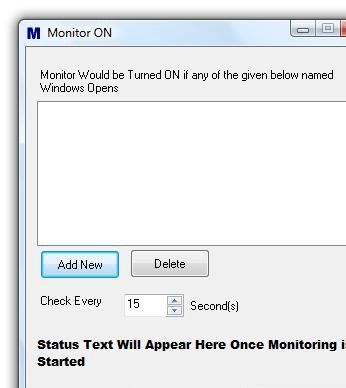
Monitor On 1.0 is simple and small application which once launched stays at your system tray. It does not consists of many features, hence is an extremely easy and uncomplicated to use. The interface presents the message to enter the window name that you want the program to monitor and turn on the system when required. Clicking ‘Add New’ option, the program produces a dialog box showing the field ‘Enter Window Title’ and ‘Exact Match’ to enter the suitable detail. The window name entered by you appears on the program screen from you can confirm the selection. If you want the match to be specific to the name you entered, you need to enable ‘Exact Match’ feature. ‘Delete’ option is available if you want to remove any of the window names from the list. Set the time for the Check intervals and click on ‘Start Monitoring’ for the program to start the process. Whenever the monitor is turned off if any of the mentioned window pops-up then the program would get active and turn on the monitor.
Monitor On 1.0 comes across as practical utility, which proves to be useful for turning on the monitor, when your specified window pops-up, so that you can easily respond to it. Rated with 2 points, the application loses out on account of its limited functionality.
User comments