


Editor's review
After completing your work on PC, we all need to go through the time-consuming and annoying shut down procedure which involves clicking on the Start menu to selecting the options. But, now you can get an easy solution for the purpose in the guise of RebootEx 2.13 that supports you to set automatic shutdown, relogon, and reboot your system. The utility is compatible with Windows 2000/XP/ NT/Vista operating systems. This tool can be used for purposes like setting the system to shutdown automatically, for limiting the PC usage time of your kids. The application is small but efficient, hence is worth using.
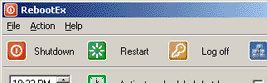
RebootEx 2.13 presents simple interface, and opens with a small window with the required options place well on it. The screen of the application presents the main features to perform actions that are Shutdown, Restart, Logoff and Remote. Clicking on any of these options would make the program take the action immediately. When opened it stays at the top of all the applications, and you can minimize/hide it in the system tray. To shut down the system at the specific time you can set the time for it, and then activate or deactivate the schedule by pressing ‘Activate scheduled shutdown’. You can even enable the feature to relogon after PC reboot. The application is provides details regarding the functioning and features, with the Help file. The application saves time and energy as it can shut down the system automatically at the set time.
RebootEx 2.13 saves your time as it is capable to shut down, reboot, or perform other such functions at the defined time or just by a simple click. Rated with 3.5 points, the application helps you in saving efforts, time, and can be conveniently used by any user.
User comments