
Free Downloads Center
e.g. Taskbar Hide - hide windows program 1.5.2

Categories

Latest Reviews

Spryka ePostMailer

Spryka ePostMailer
Spryka ePostMailer is a highly effective and free to use mass email marketing program and bulk email sender.

Multiformat File Searcher

Multiformat File Searcher
Multiformat File Searcher, will simplify and allows you to get control over your text search job within any document.

Subscribe

Taskbar Hide - hide windows program 1.5.2 Download

Editor's rating  
Users' rating   (1 votes) Rate it!
License Shareware / $19.95
Downloads 7210
Publisher Eusing Software
File size 754K
Date added 17-Oct-2008
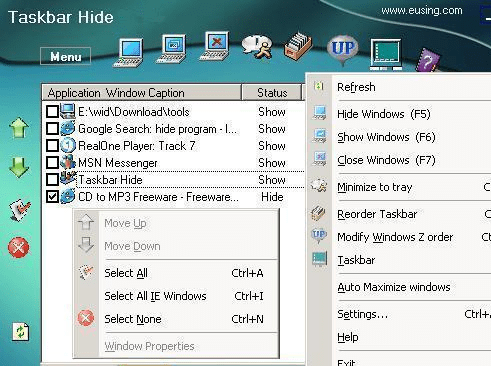
Taskbar Hide - hide windows program screenshot

Enlarge screenshot

Publisher's description
Editor's review
Submit your review

With Taskbar Hide you can fully control the taskbar.As a hide windows tool,it could hide windows program (hide applications,hide program) completely through a hotkey,also you can minimize them to the system tray instead of an icon on your taskbar.You also can change the icon and title of any window or close windows program anytime .For example,you hide some selected programs by pressing hotkey.At a later time you will be able to return all hidden windows back to the desktop and continue your work.And you also can close those hidden windows through another hotkey.

Hide some of the less used icons from the system tray.Reorder and arrange the windows on taskbar based on your choice.Set any application windows always on top or say stay on top.Show window property of application,such as window handle,class name,process id etc.Hide any of following:taskbar,start button,task window,system tray, and time clock.

This program also could maximize or minimize all windows or only IE windows.You could set options to automatically maximize new Internet Explorer window or all windows.

Editor review: Reviewer, 2009-06-15 10:09:00

Hide windows program (hide applications)completely through a hotkey or as an icon in system tray.Hide some less used icons from tray.Arrange the windows on taskbar based on your choice. Automatically maximize all new windows or only new IE windows.

Features: With Taskbar Hide you can fully control the task bar. Using Taskbar Hide you can hide any running application window. All you need to do is to select the application in the Task bar hide list and click Hide icon or click mouse right button to popup the menu and select hide item for the change to take effect. Taskbar Hide is also able to hide/show/close the program windows quickly through pressing a hot-key. As a hide windows tool,it could hide windows program (hide applications,hide program) completely through a hotkey,also you can minimize them to the system tray instead of an icon on your taskbar.You also can change the icon and title of any window or close windows program anytime .For example,you hide some selected programs by pressing hotkey.At a later time you will be able to return all hidden windows back to the desktop and continue your work.And you also can close those hidden windows through another hot-key.

You can hide some of the less used icons from the system tray. The operation is the same as to Hide/Show application windows. Set any application windows always on top or stay on top.Show window property of application,such as window handle,class name,process id etc. Hide any of following: taskbar,start button,task window,system tray, and time clock. This program also could maximize or minimize all windows or only IE windows.You could set options to automatically maximize new Internet Explorer window or all windows.

Overall: If you want to avoid clutter or want hide a few windows you are working on from general view, this one is good for that.

Visit homepage of Taskbar Hide - hide windows program

Download Taskbar Hide - hide windows program 1.5.2


windows hidden process
hide games
hotkey windows
window stay on top
maximize any window
arrange icons
time taskbar
show taskbar
hide task bar
hide file in image

Programs related to Taskbar Hide - hide windows program

Copyright © 2001-2009, Free Downloads Center.