


Editor's review
Typing long phrases and text strings like your name along with signature, designation, phone number and company details can get rather monotonous irrespective of whether you’re writing it or copying it from a file. Well, what if you get a competent assistant to perform this task effectively on your simple directions. One such assistant for you can be Text Expander and Application Launcher 1.5 which is capable of storing the text strings that can be entered anywhere just by entering the trigger characters. It lets you create different groups and add new text strings that you often have to use in various files, emails, etc, along with short strings known as triggers. Using the application, it gets easier for you to write emails, books, articles, etc by improving your writing speed.
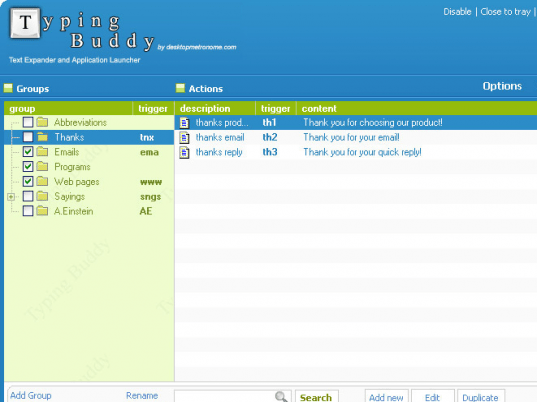
Using the Text Expander and Application Launcher you can conveniently insert repetitively used text strings into any document, file, email, etc. The console of the application has been framed considering the usage comfort of the end-users. The left pane of the utility associates different Groups, and the containing strings of the selected one are displayed on the right side area. You can even add different groups and sub-groups such as emails, salutations, references, abbreviations, etc and then add new strings within them accordingly. When you record a new string, you have to enter Description, Trigger, and Text string, and also you can set it open folder, start application, launch file, or login. Further, when you’ve added the text strings, you can easily edit, delete, or create their duplicates, whenever required. With the increasing number of strings within the program you need not worry as its powerful search features works spontaneously as you type in the related keywords. Moreover, it integrates configurations relating the Action keys, Tray icon settings, Action menu, Program restrictions, and Misc options.
The Text Expander and Application Launcher 1.5 can prove to be of great help for you to insert long and repetitive text strings by simply typing its assigned trigger text. The utility shows its proficiency in its prompt functioning and places the trigger related text string with ease which earns it a score of 4 rating points.
User comments