
Free Downloads Center
e.g. Active Backup Expert Pro 2.01

Top in this section

R-Studio

Data recovery tool for FAT, NTFS, Ext2FS file systems. File recovery after FDISK, MBR destruction, FAT damaged, virus infection. Dynamic disk support. Damaged RAID reconstruction.

Latest Reviews

Visual Importer

Visual Importer
Visual Importer, the only versatile tool that can export, transform or load database data at the rate of 14,347 records per second.

AutoTRAX Design Express

AutoTRAX Design Express
AutoTRAX Design Express is a very useful Electronic Design Suite specially designed for Electronic Engineers.

Subscribe

Active Backup Expert Pro 2.01 Download

Editor's rating  
Users' rating   (4 votes) Rate it!
License Shareware / $45
Downloads 969
Publisher OrionSoftLab
File size 4143K
Date added 30-Mar-2008
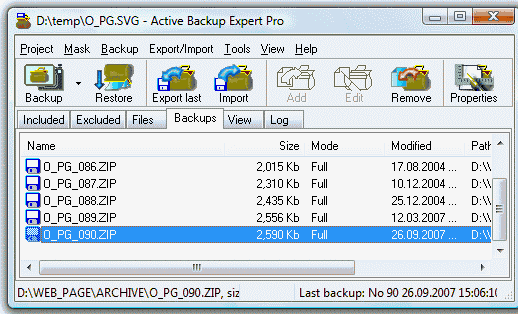
Active Backup Expert Pro screenshot

Enlarge screenshot

Publisher's description
Editor's review
Submit your review

A full-featured backup tool creates automated zip- or cab-format backups of local and network files on hard disks, CD, DVD, Blu-Ray, HD-DVD and other removable devices, local network or FTP site. A Wizard guides you through the steps of the backup-set creation: selecting the folders and filters for included and excluded files, specifying the storage folder and setting to schedule. Once you have configured your backup-sets, the ABE will create an unlimited number of backups at timed moments. Though you can use a shortcut or a hotkey to launch a backup anytime you wish. Use Incremental or Differential mode to back up only new and changed files. You can easily restore the files from any backup, view or edit their content. The export and import features are useful to synchronize the folders on two or more PCs and to span large backups across multiple discs. Other features include selecting files by date, size and attributes, Blowfish backup encryption, creating self-extracting backups, the support for the Command-line and ActiveX automation. The ample documentation is available. The ABE Pro creates the unattended backups by using the Active Task Manager included into the installation package. This automation utility can work as a stand-alone application to help you to schedule other tasks. Though, you can use the MS Task Scheduler to automate your backups as well.

Editor review: Reviewer, 2008-05-15 08:22:00

Full-featured backup tool creates automated zip- or cab-format backups of local and network files on hard disks, CD/DVD and other removable devices, local network or FTP site. Use Incremental or Differential mode to back up only new or changed files.

Pros: A full-featured backup tool creates automated zip- or cab-format backups of local and network files on hard disks, CD, DVD, Blu-Ray, HD-DVD and other removable devices, local network or FTP site. The user interface is a wizard so that minimal intervention is required by user for setting up back up details. Files to included/excluded can be specified. Selecting folders and filters for picking up the folder names are done. Choosing or specifying a storage folder is next and the schedule is fixed.

After the backup sets are created this application would keep taking back up copies at the scheduled intervals. One can create back ups any time also through a short cut or a hot key any time. Incremental back up is the way to go of course, that way one copies only the changes and save some back up space.

It’s simple to restore from any of the back up copies. View and edit them if need be. Import and export features provide the means to synchronize files on two or more machines and to span back archives across several discs. It is possible to choose a file by the date of creation, size or attributes. Blowfish encryption protects the back up archives from unauthorized access. Self extracting back ups, command line support and ActiveX automation are some of the other features worth mentioning. Users can schedule unattended backups via the active task scheduler supplied with this application or use the MD task scheduler. Documentation supplied provides support for implementing the back up policies of the organization well.

Cons: In this age of terabytes of storage becoming commodity stuff, simple back up strategies like copying a complete drive whenever there are changes becomes practical.

Overall: The application does its function very well, the interface guides the user adequately. Overall this rates a 4 star level quite easily.

Visit homepage of Active Backup Expert Pro

Download Active Backup Expert Pro 2.01


backup changed files
blu ray
converting dvd to ipod format
how to convert avi to dvd
dvd burns
converter dvd to mpeg
dvd mpeg4 rip
ntsc dvd burner
dvd to rmvb
divx dvd burn

Programs related to Active Backup Expert Pro

Copyright © 2001-2009, Free Downloads Center.