
Free Downloads Center
e.g. Handy Backup Server 6.4.0

Top in this section

R-Studio

Data recovery tool for FAT, NTFS, Ext2FS file systems. File recovery after FDISK, MBR destruction, FAT damaged, virus infection. Dynamic disk support. Damaged RAID reconstruction.

Latest Reviews

MPSuperShape

MPSuperShape
MPSuperShape is an excellent add-in for Microsoft MapPoint that allows you to combine and intersect shapes.

WinStart Manager

WinStart Manager
WinStart Manager, the advanced tool that gives a complete view of all the programs and applications launching at the Windows startup.

Subscribe

Handy Backup Server 6.4.0 Download

Editor's rating  
Users' rating   (0 votes) Rate it!
License Shareware / $599
Downloads 1820
Publisher Novosoft Handy Backup
File size 13989K
Date added 27-Nov-2009
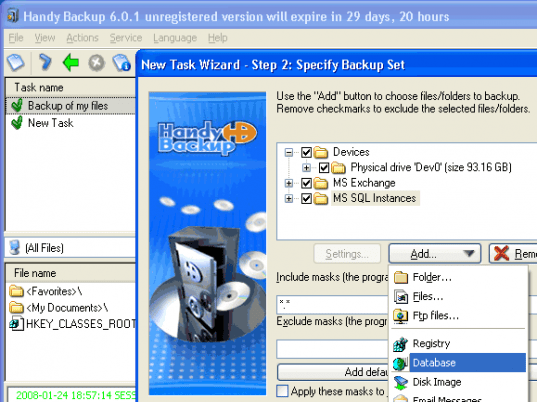
Handy Backup Server screenshot

Enlarge screenshot

Publisher's description
Editor's review
Submit your review

Handy Backup Server is a complete server-based network backup solution for small business enterprises. The utility lets you back up and recover data stored on both central server and remote computers, on a client-server scheme, and has multiple server-specific functions. Workstation backup tasks can run as service under Windows 2008/2003 Server or Vista/XP/2000, absolutely unnoticeably and not interfering with employees' work. Handy Backup Server allows backing up not only individual files and folders, but also creating drive images - backups of operating system and all applications. All workstation backup tasks are fully automated and run with low system priority which allows performing them during work hours. Comprehensible user interface provides easy step-by-step adjustment of network backup, with options of compression, encryption and flexible task scheduling. E-mail notifications, command line interface and log file generation ease task management by system administrator. Besides files, folders and HDD images, the program features plug-ins for backing up MS Exchange, MS SQL, DB2 databases and Lotus Notes/Domino data stored on the central server. Also, you can back up Oracle database and ODBC-compatible databases that can be located on both local server and remote workstations. Data transferred to the central server can be stored on the widest range of backup media: you can backup to FTP, SFTP, Network, FireWire and USB hard/flash drives, CD, DVD, Blu-Ray, HD DVD and much more. Detailed online help is available. Centralized workstation backup and an ability of fast system recovery distinguish Handy Backup Server from other network backup software. The utility proudly carries the "Certified for Windows Vista" and "Works with Windows Server 2008" logos and is acknowledged as one of the best tools for backup and recovery of the entire office network or a local server.

Editor review: Reviewer, 2007-05-24 03:32:00

If you want to keep your critical data handy then Handy Backup Server is the answer for you. It is a powerful backup software that is used extensively. It is useful for all corporate users and IT professionals. A central server is created and a back up of all machines can simply be taken on that centralized server. The backup can be taken on DVD±R/RW, CD, Blu-ray, HD DVD, remote FTP server, Local Area Network, external Firewire or USB hard/flash drives.

Apart from the backup of the day to day data it also has additional features for backup of Microsoft Outlook files, system registry and ICQ files. The application can be used to access files or folders between multiple computers on the same network.

To provide protection features like Strong file encryption and multi-choice zip compression are also available. Additionally the backup activities can be maintained in a separate log file.

Visit homepage of Handy Backup Server

Download Handy Backup Server 6.4.0


handy folders
image server
backup sftp
flash drive recovery utility
recovering usb data
dvd copy any dvd
remote backup
convert swf files to dvd
windows nt workstation
command line backup

Programs related to Handy Backup Server

Copyright © 2001-2009, Free Downloads Center.