


Editor's review
While enjoying the excursion with your family, you may love to capture those touchy moments into various image capturing devices, so as to keep reliving those moments again and again. You can use a range of devices, such as digital cameras, mobile phones, for capturing those images. Now, what would you do, if while connecting the memory card or digital camera, your PC suddenly turns off or crashes down, resulting into photo deletion from the storage device. Such situations are very annoying that make you to look out for ways to get your images back. In such case, to help recovering your images, you can try out PANTERASoft JPG Recovery 1.2. It’s a digital image recovery software application, which looks out for images in digital camera, memory card, or drive, even the formatted ones.
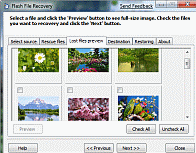
The PANTERASoft JPG Recovery 1.2 opens with simple interface with various options placed in respective tabs. These tabs are placed with sequential steps for carrying out the images recovery process. With the first tab, Select Source, you need to select the drive or storage device from where you want to recover the images. The dropdown list for making the drive selection is provided with the ‘All Available Media Drives’ field. Choosing one, simply press ‘Next’ for moving to next step, where you can ‘Start Scan’ commanding the application to rescue the images files. With the step, it also provides the details regarding Total Sectors, Bad Sectors, Progress, Sectors Read, Data Loss, and Files Found. When the scanning finishes, click Next, you would be displayed the files with thumbnail view. Now, you can preview any images and then Check or Uncheck images for recovery process. After this, with further step you have to choose the Destination folder by drive where you wish to store the files after recovery. Finally, moving to next step, you can begin the recovery process and the program recovers and restores the images at the specified location.
With the PANTERASoft JPG Recovery 1.2, it becomes rather easy to recover and restore all your lost images from any drive or storage device. For the smooth recovery process, easily negotiable features and effective performance, the program deserves 4 rating points.

I recently lost a large amount of photos from my sons birth. Attempted to recover using this software and it wouldn`t let you with out paying. After paying for it and atempting to recover I get an out of memory error. Sent mail to the companies support e-mail and after a week and three e-mails my me they wont even respond to me.