
Free Downloads Center
e.g. ClipCache Pro 3.1

Latest Reviews

Vitascene Starterkit

Vitascene Starterkit
Vitascene Starterkit is a professional tool that allows to manage and enhance the effects and transitions of images.

eCover Engineer

eCover Engineer
eCover Engineer, the professional tool that allows you to create outstanding eBook covers, CD covers, DVD covers and software box covers.

Subscribe

ClipCache Pro 3.1 Download

Editor's rating  
Users' rating   (1 votes) Rate it!
License Shareware / $24.95
Downloads 774
Publisher XRayz Software
File size 985K
Date added 29-Mar-2007
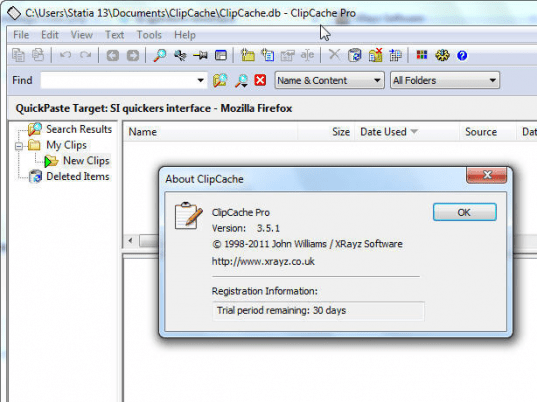
ClipCache Pro screenshot

Enlarge screenshot

Publisher's description
Editor's review
Submit your review

ClipCache Plus is like three powerful utilities in one! It's an easy-to-use and powerful clipboard extender, a full-featured text editor with many exciting instant text cleanup capabilities, and a handy QuickPaste utility which easily stores pieces of text, ready to be pasted into any application simply by pressing an assigned hotkey.

Cut and paste is probably one of the most often used functions on a computer, whether for word processing, graphics work, email, or web surfing. Unfortunately, Windows clipboard is severely limited and every clip is erased by the succeeding one. ClipCache Plus turns the windows clipboard into a powerful software you will use 50 times a day to instantaneously edit text and then store it for future use, keeping it easily accessible with an assigned keystroke if desired.

Clean up text clips using a vast array of advanced editing features, such as instant removal of those annoying >>>> from emails, removing large gaps and whitespace from emails or webtables, removing linebreaks or empty lines, stripping HTML tags, search and replace, etc. A fully functional online demo of these amazing editing features is available for a test drive at http://www.RoseCitySoftware.com/ClipCache/cc_demo.html

Folders known as Groups help categorize your clips, permitting easy organization by dragging and dropping between groups. Rename clips and edit them right in the preview pane. Hotkeys can be assigned to any clip... URLs, addresses, standard replies, any file... allowing for instant pasting into any application as a simple macro.

ClipCache Plus adopts a standard Windows look and feel (drag & drop, sorting, property sheets, right-click menus and more) while sitting quietly in the system tray on your taskbar. Whether you use it for word processing, graphics work, email, web surfing or data management, ClipCache Plus is one utility you can't afford to be without! If you're gonna clip it, cache it!

Editor review: Reviewer, 2007-12-13 06:48:00

Often when you’re stuck with troublesome repetitive copy paste tasks don’t you think like getting rid of the hassle and have something that could let you use the text that you copied earlier. Even the windows clipboard does not support keeping different copied text as it replaces the earlier one with the new ones. But now you can take a deep breathe and need not to get frustrated with copying the matter every time you need it. ClipCache Pro 3.1 would save all your copied text and let you have them whenever you require.

ClipCache Pro 3.1 can be smoothly downloaded and even the installation is a piece of cake. The screen of the software is quite normal like any other window so that you feel comfortable to work with it. When you copy the clips they get collected automatically so that you can use them whenever you need. You can open the program that stays at your system tray by the default settings. If you do not want to have the program opened each and every time then you can even assign a hotkey to each text for pasting it. You can view all the clips folders on the left side panel and have them listed on the upper panel of the middle screen. When you click a certain clip from the list then detailed clip is shown in the box below the list. If you want to have the clipped text edited then you can even edit the text and save the changes also. Thus following the feature it also performs the function of the Text Editor. The program also show that where the text has been taken from and you can also select to customize the highlights. It provides you with different other features also like to stay at the top of the applications. For more assistance relating to this assistant the Help Guide is provided with the program.

ClipCache Pro 3.1 is good assistant for managing the text that you need to put again and again in different files. The software has been given 4 rating points for the effective results and its storing capacity with the best features to play along with.

Visit homepage of ClipCache Pro

Download ClipCache Pro 3.1


editing avi clips
clip mp3 file
wmv clip
instant text
audio clip editor
convert video clip
cut movie clips
extract clip dvd
rmvb clip
psp mp4 clips

Programs related to ClipCache Pro

Copyright © 2001-2009, Free Downloads Center.