


Editor's review
The task of repetitive copying and pasting often turns out to be monotonous and boring for web developers and content writers. However, this has been eased by the use of default Windows Clipboard application to some extent. But with the growing complexity of the task, this default Windows Clipboard isn`t that useful now. So, there is a need for some revamped clipboard application that can handle copying and pasting in a more comprehensive manner. You can find a large number of such clipboard applications over the web, out of which Spartan Multi Clipboard 4.00.00 software comes out as a credible one. The program supports storing 25 clips and several permanent clips that are used repetitively. It functions effectively to capture clips copied content simultaneously and lets you use hotkeys to pasting them at the desired location.
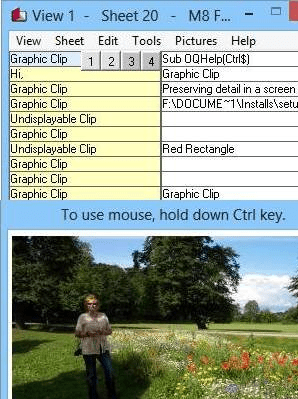
The Spartan Multi Clipboard 4.00.00 launches with an extremely simple interface. It presents rows and columns forming different sections where the copied items would be stored separately. The program integrates with different text based applications to capture and store text, images, address, links, email addresses, phone numbers, etc. The yellow area on the clipboard is where the program stores the copied 25 items, whereas the white area displays the clips that you’ve selected to be stored permanently. A clip can be stored as permanent simply by moving or copying it to the white space, which would not be replaced by the program. After 25 clips have been copied, from the 26 item the program would begin replacing the clips from the very first cell. The replaceable clips can only be 25 but you can store any number of permanent clips. Even, the clips stored with the program can be highlighted, sorted, copied, selected, and bulk pasted, according to your requirement. Moreover, the utility supports importing digital images and graphics, opening picture browser, alter graphics option, and provides features such as year planner, Turn On/Off clipboard, change font, backup and restore, and various others.
Spartan Multi Clipboard 4.00.00 helps you in copying and saving the repetitive text, images, email addresses, etc, for using them with different programs. The utility, for its smoothly operable options and proficient functioning capability, is assigned with 3 rating points.
User comments