
Free Downloads Center
e.g. xNeat Clipboard Manager 1.0.0.5

Latest Reviews

File Backup Watcher Professional

File Backup Watcher Professional
File Backup Watcher Professional, the professional tool that makes you ready to face any situations by making handy backups of your vital data.

Registry Flashlight Fixer

Registry Flashlight Fixer
Registry Flashlight Fixer is a simple and handy registry booster that can also control hidden Microsoft Windows operation system settings.

Subscribe

xNeat Clipboard Manager 1.0.0.5 Download

Editor's rating  
Users' rating   (7 votes) Rate it!
License Freeware / $0.00
Downloads 665
Publisher xNeat
File size 560K
Date added 13-Sep-2008
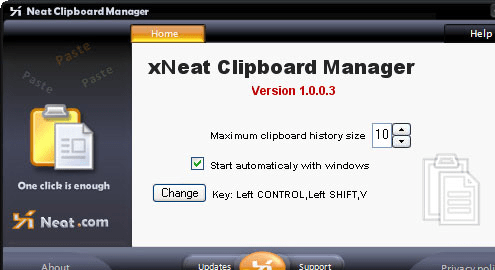
xNeat Clipboard Manager screenshot

Enlarge screenshot

Publisher's description
Editor's review
Users' reviews (2)
Submit your review

Windows clipboard has the disadvantage that you can only copy once before pasting, xNeat Clipboard Manager solves such problem by keeping track of all your copied items and giving you quick access to them.

xNeat clipboard manager is handy and very simple to use. it captures clipboard items as they are copied to the Windows Clipboard, and you can simply bring up a menu containing all the previously copied items and select the item you want to paste from it using a hot key.

For regularly used text you can make it permenat in xNeat clipboard manager's menu by right clicking on it, then select Make Sticky, you can also delete any item as well.

xNeat Clipboard Manager can also search clipboard text on Google and even make a translation of the text in different languages .Itīs simple, fast and convenient

Editor review: Reviewer, 2009-04-28 04:51:00

Extends capabilities of Windows Clipboard.

Features: Windows clipboard has a limitation. You can only copy once, though paste it many times. So if there are multiple things to be copy pasted you could only do it one by one. xNeat Clipboard Manager lets you copy multiple items before pasting. It organizes the clippings so that you can find, the one you need, easily. It keeps track of things copied into the clipboard. You can bring up a menu of items containing the clippings so that you could choose one to paste. A hot key can be set up for the paste operation. If you need to change this combination, that is possible too. You can choose to have any key combinations that is convenient to you.

The clips that you use regularly can remain in the clipboard permanently. You just right click on the xNeat Clipboard manager`s menu and select make sticky. If you do not need some of these sticky items later, you could of course delete them easily. You can select one of the clippings in the clipboard and go out and search the string in Google. Get it translated easily too.

Overall: It adds functionality to enhance the Windows clipboard features alright. But not all that many!

Visit homepage of xNeat Clipboard Manager

Download xNeat Clipboard Manager 1.0.0.5


hot key
clipboard plus
plus menu
hot or not
some like it hot
always hot
copy paste
copy text
text copy
copy text from

Programs related to xNeat Clipboard Manager

Copyright © 2001-2009, Free Downloads Center.